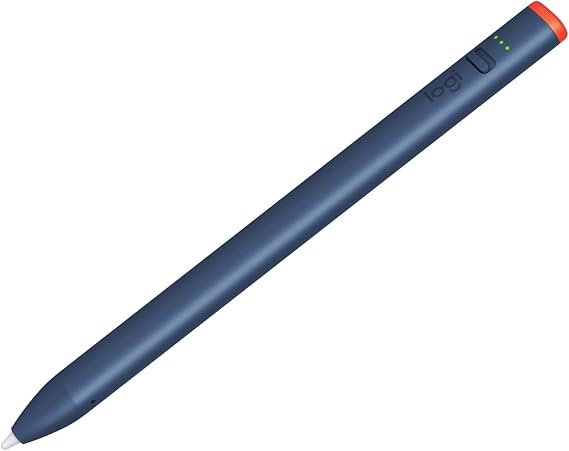
Logitech Crayon Digital Pencil for iPad USB-C Ports | Apple Pencil technology, anti-roll design, dynamic smart tip
BND 109
Price Details
Excluding Shipping & Custom charges ( Shipping and custom charges will be calculated on checkout )
*All items will import from US
QTY:
Ubuy works hard to protect your security and privacy. Our advanced payment security system ensures confidentiality by encrypting your information during transmission using AES (Advanced Encryption Standards) and SSL (Secure Socket Layer) protocols. Your payment details are 100% secure as we do not share your payment details with third party sellers.
Logitech Crayon is a versatile digital stylus pencil for iPad that lets you use hundreds of Apple Pencil supported apps in dynamic new ways.
Fast
Shipping
Free
Return*
Secure Packaging
100% Original Products
PCI DSS Compliance
ISO 27001 Certified
What Stands Out
Product Details
| Country of Origin | This item will be imported from US |
| Item Weight | 0.24 lbs (110 grams) |
| What is in the box | Logitech Crayon Digital Pencil... For more details, please check description/product details |
Who Should Buy?
-
Students
Ideal for students who take notes, sketch, or annotate documents on their iPad efficiently using precise control.
-
Artists
Great for digital artists who want to create illustrations or designs with a natural writing experience and precision.
-
Educators
Helpful for teachers in demonstrating concepts and engaging students through interactive lessons on the iPad.
-
Professional Designers
May not be suited for professional designers needing advanced pressure sensitivity and advanced features of the Apple Pencil.
Product Description
Logitech Crayon Digital Pencil for iPad USB-C Ports | Apple Pencil technology, anti-roll design, dynamic smart tip
Customer Questions & Answers
-
Question:
What is the Logitech Crayon and how does it work with iPads?
Answer: The Logitech Crayon is a digital pencil designed for use with iPads featuring USB-C ports. It utilizes Apple technology to deliver pixel-precision and smooth performance without lag. This allows users to write, sketch, and navigate with outstanding accuracy. Whether you’re jotting down notes or illustrating a project, the Crayon's dynamic smart tip adapts to your touch, offering a seamless experience. It connects easily via Bluetooth, ensuring a hassle-free setup. -
Question:
Is the Logitech Crayon compatible with all iPad models?
Answer: The Logitech Crayon is specifically compatible with iPads that have USB-C ports, including the latest iPad Pro models and the iPad Air. It may not work with older iPad models that use the Lightning connector. To confirm compatibility, check Apple's website or the product specifications before purchasing. This compatibility ensures that you can enjoy the full capabilities of the Crayon with your favorite device. -
Question:
How does the fast charge feature work with the Logitech Crayon?
Answer: The fast charge feature of the Logitech Crayon provides the convenience of quick usage. With just a 2-minute charge, you can gain up to 30 minutes of battery life, making it perfect for on-the-go usage. This is particularly helpful for busy professionals or students who need to quickly jot down ideas or sketches without long downtimes. Simply plug it in with the included USB-C cable, and you’re back to creativity in no time. -
Question:
What makes the dynamic smart tip of the Logitech Crayon unique?
Answer: The dynamic smart tip of the Logitech Crayon adjusts according to your writing style, providing varying line thickness based on the angle and pressure applied. This feature enhances the natural feel of writing, allowing for detailed artwork or precise note-taking. Users can explore their creativity without limitations, making the Crayon perfect for artists, designers, and students who value precision in their digital creations. -
Question:
Can I use the Logitech Crayon for drawing and sketching?
Answer: Yes, the Logitech Crayon is an excellent tool for drawing and sketching on iPads. Its precision and responsiveness make it ideal for artists who want to create high-quality digital artwork. The ability to adjust line thickness through pressure sensitivity adds depth to illustrations. Many users utilize it for art apps like Procreate, making it a popular choice among creative professionals and hobbyists alike. -
Question:
How do I connect the Logitech Crayon to my iPad?
Answer: Connecting the Logitech Crayon to your iPad is straightforward. Simply turn on the Crayon, and it will automatically pair with your iPad via Bluetooth. There's no complex setup needed, allowing you to start using it right away. Once paired, enjoy seamless navigation and writing without the interruptions that often come with other stylus options, providing a smooth user experience for all your iPad activities. -
Question:
Are there any apps recommended for using with the Logitech Crayon?
Answer: The Logitech Crayon works well with a variety of apps designed for drawing, note-taking, and sketching. Recommended apps include Apple Notes, Notability, and Procreate, among others. These applications leverage the Crayon's pixel precision and pressure sensitivity to enhance your experience. Whether you're a student taking lecture notes or an artist creating detailed graphics, the Crayon can elevate your productivity and creativity. -
Question:
Does the Logitech Crayon have palm rejection technology?
Answer: Yes, the Logitech Crayon features palm rejection technology, allowing you to rest your hand comfortably on the iPad screen while writing. This means you can focus on your work without worrying about accidental marks from your palm. This feature is indispensable for artists and writers who use the Crayon for prolonged periods, ensuring that your strokes remain precise and your canvas remains clean. -
Question:
What colors are available for the Logitech Crayon?
Answer: The Logitech Crayon currently comes in a sleek gray color, designed to complement the modern aesthetic of Apple products. Its understated design balances functionality with style, making it both practical and visually appealing. This neutral color scheme is popular among users who prefer a professional look while using the device in various settings, from classrooms to boardrooms. -
Question:
Where can I buy the Logitech Crayon in Brunei?
Answer: You can purchase the Logitech Crayon for iPads with USB-C ports from Ubuy in Brunei. Ubuy offers a reliable shopping experience with a variety of products available, allowing you to find the Logitech Crayon conveniently. Take advantage of their platform for better access to tech products that enhance your iPad experience.
Logitech Stylus Pens Editorial Review
The Logitech Crayon Digital Pencil for iPad has garnered positive feedback from users, particularly for its ease of use and affordability compared to the Apple Pencil. Many customers appreciate that the Crayon connects seamlessly to multiple iPads with a simple click, eliminating the hassle of managing different styluses for different devices. Its design is praised for being sturdy and non-rollable, which adds to its usability, especially for younger users or those prone to misplacing their tools. Despite its many advantages, users have noted that the Logitech Crayon lacks pressure sensitivity, which is a key feature often desired for more detailed work, such as drawing. This limitation may deter some artists or professional users looking for a tool that can mimic traditional drawing instruments more closely. However, the battery life is Consistently highlighted as a strong point, with one user mentioning it can last up to two weeks on a single charge, albeit they recommend nightly charging for peace of mind. The introduction of a physical on-off switch has been well received, replacing a less convenient pushbutton from older models and contributing to the overall durability of the product. However, some users have expressed a preference for the orientation of the switch, wishing it were reversed for more intuitive use. Overall, the Logitech Crayon is seen as a reliable, budget-friendly alternative to the Apple Pencil, suitable for casual use and everyday tasks. It delivers solid performance for note-taking, browsing, and basic drawing, making it a great option for students or anyone looking to enhance their iPad experience without a significant financial investment. **
Customer Reviews & Ratings
-
5 Star
100%
-
4 Star
0%
-
3 Star
0%
-
2 Star
0%
-
1 Star
0%
Review this product
Share your thoughts with other customers
Pros
- Easy one-click connection to multiple iPads
- Sturdy, non-rollable design
- Excellent battery life (up to two weeks)
- Budget-friendly alternative to the Apple Pencil
- Physical on-off switch for enhanced durability
Cons
- No pressure sensitivity feature
Platform Trust & Buyer Confidence
“Excellent quality and original too,when ubuy send original things I will appreciate that ,I very satisfied thank you”
“The order and delivery progress was communicated very well. Package arrived within the estimated time. Products arrived as expected in good condition.”
“Good supply of products. Safe payment methods, and shipment worldwide! Genuine products.”
“Was my first time buying a product from Ubuy, but I found it so helpful. This is reliable. Gonna place a new order!”
“Ubuy is a great online platform to buy stuff. Reliable, fast delivery time and great value for money. I've been using Ubuy online shopping platform for three years now and will continue to do so.”
Product Price History
Important information
- Limitations : For products shipped internationally, please note that any manufacturer warranty may not be valid; manufacturer service options may not be available; product manuals, instructions, and safety warnings may not be in destination country languages; the products (and accompanying materials) may not be designed in accordance with destination country standards, specifications, and labeling requirements; and the products may not conform to destination country voltage and other electrical standards (requiring use of an adapter or converter if appropriate). The recipient is responsible for assuring that the product can be lawfully imported to the destination country. When ordering from Ubuy or its affiliates, the recipient is the importer of record and must comply with all laws and regulations of the destination country.
- Not all the products listed on Ubuy are for sale, as Ubuy is a global search engine. Products are subject to export/trade regulations.
BND 109
Order now and get it around Tuesday, August 25
This item is not restrict in my country.(Please click on above link if this item is not restrict in your country, So our team will review and allow.)
QTY:
PCI DSS compliant and ISO 27001:2022 certified, with encrypted payments and full buyer protection on every order.
Features & Benefits
- Height: 6.5 in (163 mm) Width: 0.5 in (12 mm) Depth: 0.3 in (8 mm) Weight: 0.7 oz (20 g)
- Up to 7 hrs of active writing time on a full charge
- Logitech Crayon uses Apple Pencil technology so you can write and draw naturally in pixel-perfect precision without missing a single line or detail
- Just tilt this iPad stylus pencil and the smart tip will adjust line weight automatically to the needed thick or thin size
- This Logitech stylus pen for iPad connects to iPad instantly—just slide down the off/on switch and start writing
- The Crayon Apple iPad stylus pen charges via USB-C and gets up to 7 hrs of writing time from a single charge
Ubuy Assurance
Experience worry-free shopping with 100% original products, PCI DSS-compliant payment security, ISO 27001-certified data protection, the fastest cross-border delivery, free returns *, and secure packaging on every order.


