0 ratings

Item #:
221183070
UtechSmart Universal Docking Station, 15 in 1 USB Docking Station with SSD Enclosure, USB C Dock with Dual HDMI,VGA,PD3.0,SD/TF,RJ45,Audio&Micro,USB
Item #:
221183070
BND 236
Price Details
Excluding Shipping & Custom charges ( Shipping and custom charges will be calculated on checkout )
*All items will import from US
0 ratings
Write a review
In stock
 Imported from USA store
QTY:
Order now and get it around Sunday, June 28
Secured transaction
Ubuy works hard to protect your security and privacy. Our advanced payment security system ensures confidentiality by encrypting your information during transmission using AES (Advanced Encryption Standards) and SSL (Secure Socket Layer) protocols. Your payment details are 100% secure as we do not share your payment details with third party sellers.
Our Top Logistics Partners


Achieve network speeds of up to 1000Mbps, minimal latency, and swift download/upload rates, enabling a continuous online experience.

Fast
Shipping

Free
Return*

Secure Packaging

100% Original Products

PCI DSS Compliance

ISO 27001 Certified


Note: Step Down Voltage Transformer required for using electronics products of US store (110-120). Recommended power converters Buy Now.


What Stands Out
Multi-Port Access
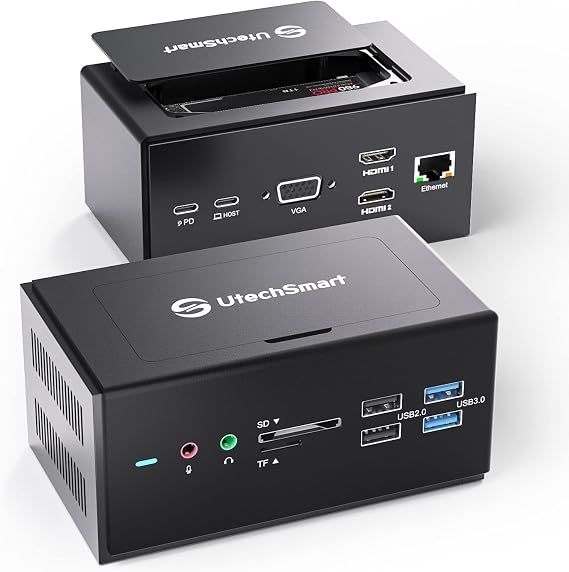
The UtechSmart docking station provides 15 versatile ports, ensuring seamless connectivity for various devices, thereby enhancing productivity for both Mac and Windows laptop users.
High-Quality Display
Dual HDMI and VGA outputs enable high-definition video output, allowing users to extend their workspace and enjoy vibrant displays for presentations and projects.
Built-In SSD Enclosure
Included SSD enclosure offers additional storage options while ensuring data portability, perfect for professionals requiring quick access to files and robust backup solutions.
Product Details
Product Description
UtechSmart Universal Docking Station, 15 in 1 USB Docking Station with SSD Enclosure, USB C Dock with Dual HDMI,VGA,PD3.0,SD/TF,RJ45,Audio&Micro,USB Ports, for MacOS&Windows Laptop
Have any Query? Chat with us
Customer Questions & Answers
-
Question:
What devices are compatible with the UtechSmart Universal Docking Station?
Answer: The UtechSmart Universal Docking Station is compatible with a wide range of devices, including both MacOS and Windows laptops. It supports USB-C and USB 3.0 interfaces, allowing seamless connectivity with modern laptops, desktops, and even select tablets. This versatility makes it ideal for users with multi-device setups or those looking to expand their connectivity options. -
Question:
How does the SSD enclosure work in the docking station?
Answer: The built-in SSD enclosure allows you to install an SSD to expand your storage capacity. This means you can transfer data quickly, accessing or backing up files efficiently. It's perfect for designers, video editors, and gamers who require fast read/write speeds for large files. Simply connect your SSD to the docking station to utilize this feature. -
Question:
Can I connect multiple monitors using the UtechSmart docking station?
Answer: Yes, the UtechSmart Docking Station features dual HDMI outputs, enabling users to connect up to two external monitors. This functionality enhances productivity by allowing you to extend your desktop space, making it particularly useful for multitaskers, professionals working with large datasets, or media creators who need a wider display area. -
Question:
What is the maximum resolution supported by the HDMI outputs?
Answer: The HDMI outputs on the UtechSmart Universal Docking Station support a maximum resolution of 4K at 30Hz. This high resolution ensures that your visuals are crisp and clear, which is essential for tasks like graphic design, video editing, or gaming. Be sure to use high-quality HDMI cables to achieve the best results. -
Question:
Does the docking station support power delivery (PD) charging?
Answer: Absolutely! The UtechSmart Dock is equipped with PD3.0 technology, allowing it to deliver power to connected devices while simultaneously being powered itself. This means you can charge your laptop and connect peripheral devices without needing multiple adapters, which is ideal for users who prefer a neat workstation setup. -
Question:
What types of ports does this docking station include?
Answer: The docking station boasts 15 different ports, including Dual HDMI, VGA, USB-C, multiple USB 3.0 ports, SD/TF card slots, RJ45 Ethernet, and audio in/out ports. This extensive range allows users to integrate various peripherals, such as printers, storage devices, and audio equipment, making it a comprehensive solution for diverse needs. -
Question:
Is it possible to use the docking station with both Mac and Windows operating systems?
Answer: Yes, the UtechSmart Universal Docking Station is designed to be universally compatible with both Mac and Windows operating systems. This cross-platform functionality offers flexibility for users who may switch between devices or work in a mixed-environment setting. It's tailored for ease of use across both systems, ensuring you can plug and play without hassle. -
Question:
How do I set up the UtechSmart docking station?
Answer: Setting up the UtechSmart Docking Station is straightforward. Connect it to your laptop using the USB-C cable provided, and then plug in any additional peripherals via the available ports. For multiple monitors, connect them to the HDMI outputs and adjust your display settings from your device for optimal use. This method minimizes complexity and streamlines the setup process. -
Question:
What advantages does the RJ45 port provide?
Answer: The RJ45 Ethernet port in the UtechSmart Docking Station offers a stable and fast wired internet connection. This is advantageous for users who require high-speed internet for activities such as gaming, streaming, or large file transfers, ensuring a reliable connection that is often superior to Wi-Fi. It’s an essential feature for anyone needing robust network performance. -
Question:
Where can I buy the UtechSmart Universal Docking Station in Brunei?
Answer: You can purchase the UtechSmart Universal Docking Station on Ubuy, a trusted e-commerce platform that provides a wide selection of tech gadgets. Ubuy offers fast service and customer support, making it convenient for shoppers looking to enhance their electronic setups.
UtechSmart Docking Stations Editorial Review
The UtechSmart Universal Docking Station is receiving a mixed reception from users who have tested its capabilities with a variety of devices. One of its major strengths is its broad compatibility, particularly with USB-C ports, which often cause issues with third-party peripherals on popular laptops. Users praised the solid build, compact size, and the extensive range of ports available, including Ethernet, HDMI, USB 3.0, USB-C, and SD card readers, making it an ideal hub for individuals requiring multiple connections for their devices. Many customers report that the docking station operates seamlessly with various devices, harnessing its numerous ports for an array of tasks such as music production, file transfers, and device charging. The user-friendly nature is bolstered by its lightweight design and included carrying bag, enhancing its appeal for those needing a portable solution. However, the experience is not universally positive. Some users have encountered significant issues with the hub's stability and performance. Problems such as slow charging capabilities, repeated random disconnections, and malfunctioning ports have been reported, particularly when used with specific devices like a Samsung phone. Concerns about longevity arose when customers reported failures after a few months of use, prompting returns and reluctance to repurchase. In summary, while the UtechSmart Universal Docking Station boasts an impressive range of features and generally performs well, potential buyers should be aware of the performance inConsistencies that some users have experienced. Those looking for a versatile docking solution may find it meets their needs, but caution is advised regarding durability and device compatibility. **
Customer Reviews & Ratings
1 customers ratings
-
5 Star
100%
-
4 Star
0%
-
3 Star
0%
-
2 Star
0%
-
1 Star
0%
Review this product
Share your thoughts with other customers
Pros
- Wide range of ports including HDMI, USB 3.0, Ethernet, and SD card readers
- Solid build quality and lightweight design
- Straightforward setup and broad compatibility with various devices
Cons
- Some users report slow charging capabilities
Product Price History
Important information
- Limitations : For products shipped internationally, please note that any manufacturer warranty may not be valid; manufacturer service options may not be available; product manuals, instructions, and safety warnings may not be in destination country languages; the products (and accompanying materials) may not be designed in accordance with destination country standards, specifications, and labeling requirements; and the products may not conform to destination country voltage and other electrical standards (requiring use of an adapter or converter if appropriate). The recipient is responsible for assuring that the product can be lawfully imported to the destination country. When ordering from Ubuy or its affiliates, the recipient is the importer of record and must comply with all laws and regulations of the destination country.
- Not all the products listed on Ubuy are for sale, as Ubuy is a global search engine. Products are subject to export/trade regulations.
BND 236
Order now and get it around Sunday, June 28
This item is not restrict in my country.(Please click on above link if this item is not restrict in your country, So our team will review and allow.)
QTY:
Secured transaction
Ubuy works hard to protect your security and privacy. Our advanced payment security system ensures confidentiality by encrypting your information during transmission using AES (Advanced Encryption Standards) and SSL (Secure Socket Layer) protocols. Your payment details are 100% secure as we do not share your payment details with third party sellers.
Our Top Logistics Partners
Fastest cross-border delivery
Features & Benefits
- Achieve lightning-fast network speeds of up to 1000Mbps.
- Two USB 3.0 ports offer 5Gbps transfer rates, enhancing data speed.
- Supports multitasking across three 1080P displays with dual HDMI and VGA ports.
- Compatible with a wide range of devices, including Windows and MacOS.
- Intuitive design with slip-resistant features for optimal stability.
- Compact docking station with SD/TF card slot and up to 2TB SSD support.