- Home Page /
- Electronics /
- Home Audio /
- Home Audio Accessories /
- Cables /
- Power Cords /
- DC Power Jack Port Socket Slot in Cable Repla...
0 ratings


Item #:
68899324
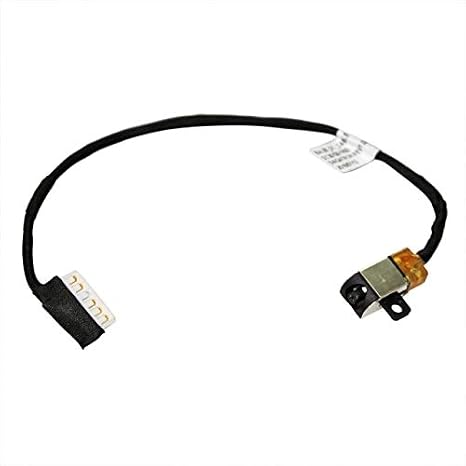
DC Power Jack Port Socket Slot in Cable Replacement with Wire Harness for Dell Inspiron 15 17 5000 5565 5567 P66F P66F001 5767 P32E P32E001 0R6RKM
85% of respondents would recommend this to a friend
Item #:
68899324
BND 22
Price Details
Excluding Shipping & Custom charges ( Shipping and custom charges will be calculated on checkout )
*All items will import from US
0 ratings
Write a review
In stock
 Imported from USA store
QTY:
Order now and get it around Tuesday, September 29
Secured transaction
Ubuy works hard to protect your security and privacy. Our advanced payment security system ensures confidentiality by encrypting your information during transmission using AES (Advanced Encryption Standards) and SSL (Secure Socket Layer) protocols. Your payment details are 100% secure as we do not share your payment details with third party sellers.
Our Top Logistics Partners


Replacement DC Jack Charging Cable for Dell Inspiron 15 17 5000 5767 5565 5567.

Fast
Shipping

Free
Return*

Secure Packaging

100% Original Products

PCI DSS Compliance

ISO 27001 Certified



Note: Step Down Voltage Transformer required for using electronics products of US store (110-120). Recommended power converters Buy Now.


What Stands Out
Direct Compatibility
Specifically designed for Dell Inspiron 15 and 17 models, ensuring perfect fit and functionality without the need for modifications.
Easy Installation
Comes with a ready-to-use wire harness, allowing users to quickly replace faulty power jacks without technical expertise.
Durable Design
Built with high-quality materials to withstand daily usage, ensuring long-lasting performance and reliability for your laptop's power needs.
Product Details
- Replacement DC Jack Charging Cable for Dell Inspiron 15 17 5000 5767 5565 5567
- Compatible with part numbers: 0R6RKM and R6RKM
- Designed to replace damaged charging port or non-functional DC Power Jack cable
- Ensure compatibility by checking the model number or part number on your existing cable
- Installation requires laptop disassembly and professional skill is recommended
- Part Number: 0R6RKM/R6RKM
| Connector Type | Dc Power Connectors |
| Cable Type | Electrical |
| Compatible Devices | Laptop |
| Other Special Features of the Product | Tangle Free |
| Compatible Phone Models | No Compatible Phone Models |
| Connector Gender | Male-to-Female |
| Number of Pins | 2 |
| Wattage | 65 watts |
| Maximum Voltage | 43 volts_of_direct_current |
| Unit Count | 1 Count |
| Item Weight | 0.02 kg |
| Number of Items | 1 |
| Outer Material | Plastic or Rubber |
| Brand Name | PHONSUN |
| Customer Package Type | FFP |
| Model | 0R6RKM |
| Manufacturer | PHONSUN |
| Recommended Uses For Product | charging laptops |
| Specification Met | CE |
| Indoor Outdoor Usage | Indoor, Outdoor |
| Color | Black |
| Item Shape | Round |
| Brand | PHONSUN |
| Special Feature | Tangle Free |
Who Should Buy?

-
DIY Enthusiasts
Ideal for users who enjoy repairing their laptops and prefer cost-effective solutions for electrical issues.
-
Laptop Users
Perfect for Dell Inspiron owners facing power connection problems and needing a reliable replacement part.
-
Budget-Conscious Users
A great option for those looking to save on repair costs without compromising on quality and functionality.

-
Non-Technical Users
Not suitable for individuals unfamiliar with laptop repairs, as installation may require technical skills and tools.
Product Description
DC Power Jack Port Socket Slot in Cable Replacement with Wire Harness for Dell Inspiron 15 17 5000 5565 5567 P66F P66F001 5767 P32E P32E001 0R6RKM R6RKM DC30100YN00 DC30100ZM00 BAL30_DC_Cable
Have any Query? Chat with us
Customer Questions & Answers
-
Question:
What is a DC Power Jack Port Socket Slot and why do I need a replacement?
Answer: A DC Power Jack is the component of your laptop that connects the power adapter to the laptop's internal power system. If this part gets damaged due to wear and tear, your laptop won't charge effectively, which can lead to further battery issues. Replacing it helps restore your laptop’s functionality and ensures uninterrupted power supply, making it crucial for maintaining optimal performance. -
Question:
Is this power jack compatible with my Dell Inspiron model?
Answer: Yes, this DC Power Jack Port is specifically designed for multiple Dell Inspiron models, including the 15 and 17 series such as 5000, 5565, 5567, and others listed. It features an exact fit to ensure seamless installation. To confirm compatibility, always check your model number against the product specifications before purchasing. -
Question:
How do I install the DC Power Jack Port Socket?
Answer: Installing the DC Power Jack requires some technical skills as it involves opening the laptop and accessing the motherboard. First, disconnect your laptop from any power source. Next, remove the back cover, locate the power jack, and gently remove the old jack before installing the new one. Ensure all connections are secure, then reassemble the device. If you’re not comfortable performing this task, it’s advisable to consult a professional. -
Question:
What tools do I need for the installation of the power jack?
Answer: To install the DC Power Jack Port, you generally need a set of precision screwdrivers, a spudger for prying open the casing, and possibly tweezers for handling small components. These tools ensure you can work carefully and effectively without causing damage to the surrounding parts of your laptop. -
Question:
What symptoms indicate that I need a new power jack?
Answer: Common symptoms of a failing DC Power Jack include the power connector being loose, the laptop not charging despite using a working adapter, or intermittent connectivity when plugging in the charger. If you notice these signs, it's a good indication that a replacement may be necessary to restore normal charging functionality. -
Question:
Can using a bad power jack damage my laptop?
Answer: Yes, using a faulty DC Power Jack can lead to inconsistent charging and potentially cause damage to the motherboard or power circuits over time. It can also lead to battery malfunctions, which might require more extensive repairs. For these reasons, it is critical to replace a failing power jack as soon as you notice issues. -
Question:
How does the wire harness work with the DC Power Jack?
Answer: The wire harness is an essential component that connects the DC Power Jack to the laptop's motherboard. It facilitates the transfer of electrical signals from the power adapter to the laptop. When replacing the power jack, ensure that the wire harness is securely connected to avoid any electrical issues during operation. -
Question:
What should I do if I cannot install the power jack myself?
Answer: If DIY installation seems daunting, the best course of action is to seek professional help. Many computer repair services specialize in laptop repairs and can replace the DC Power Jack efficiently. Providing them with the replacement part can also save costs, ensuring that your laptop receives the correct component for a seamless restoration. -
Question:
Are there any specific precautions I should take while replacing the power jack?
Answer: Absolutely, safety precautions are vital. Always disconnect your laptop from any power source before starting, work on a non-static surface, and discharge any static electricity by touching a grounded metal object. Additionally, handle all components gently to avoid damage. These steps help ensure a safe and successful repair process. -
Question:
Where can I buy the DC Power Jack Port Socket Slot in Brunei?
Answer: You can purchase the DC Power Jack Port Socket Slot with Wire Harness on Ubuy in Brunei. Ubuy offers a variety of electronic parts and accessories, ensuring you get the right component for your Dell Inspiron model with ease. Check their website for availability and purchasing options that suit your needs.
PHONSUN Power Cords Editorial Review
No editorial reviews found
Customer Reviews & Ratings
1 customers ratings
-
5 Star
100%
-
4 Star
0%
-
3 Star
0%
-
2 Star
0%
-
1 Star
0%
Review this product
Share your thoughts with other customers
Platform Trust & Buyer Confidence

JK
Jasmin
Verified buyer
“Great products and very good service: very easy and very fast international delivery.”
9 September 2026 · via Trustpilot
AG
Anke
Verified buyer
“Wonderful online shopping experience, smooth transaction from the start. Payment method works conveniently and delivery is unexpectedly fast and reliable. You go the extra mile for service. What makes this even more amazing, you deliver to Namibia. I will remain a happy Ubuy customer and will increase my purchases for sure! Thank you!”
10 September 2026 · via Trustpilot
H
Hazel
Verified buyer
“Very easy to find the products what you need, and so fast delivery, that’s why I highly recommended to others costumers to used ubuy.”
10 September 2026 · via Trustpilot
O
Opaleye
Verified buyer
“I received exactly what I ordered I was skeptical about your site because that was my first time to order. But the order came timely and neatly packaged. I was not disappointed. Thank you.”
11 September 2026 · via Trustpilot
AC
Adele
Verified buyer
“Easy to find and order what you want on the website. Delivery is quick to the UK”
8 September 2026 · via Trustpilot
Secure Checkout
Global Delivery
Easy Returns
Genuine Products
Product Price History
Important information
- Limitations : For products shipped internationally, please note that any manufacturer warranty may not be valid; manufacturer service options may not be available; product manuals, instructions, and safety warnings may not be in destination country languages; the products (and accompanying materials) may not be designed in accordance with destination country standards, specifications, and labeling requirements; and the products may not conform to destination country voltage and other electrical standards (requiring use of an adapter or converter if appropriate). The recipient is responsible for assuring that the product can be lawfully imported to the destination country. When ordering from Ubuy or its affiliates, the recipient is the importer of record and must comply with all laws and regulations of the destination country.
- Not all the products listed on Ubuy are for sale, as Ubuy is a global search engine. Products are subject to export/trade regulations.
BND 22
Order now and get it around Tuesday, September 29
This item is not restrict in my country.(Please click on above link if this item is not restrict in your country, So our team will review and allow.)
QTY:
Secured transaction
PCI DSS compliant and ISO 27001:2022 certified, with encrypted payments and full buyer protection on every order.
Our Top Logistics Partners
Fastest cross-border delivery
Features & Benefits
- Compatible with Dell Inspiron 15 5000 5565 5567, 17 5767
- Replace part number: 0R6RKM/R6RKM
- Replace damaged charging port or non-functional cable
- Verify model number or part number before purchase
- Laptop disassembly and professional skill required for installation
Ubuy Assurance
Experience worry-free shopping with 100% original products, PCI DSS-compliant payment security, ISO 27001-certified data protection, the fastest cross-border delivery, free returns *, and secure packaging on every order.