0 ratings


Item #:
10776212
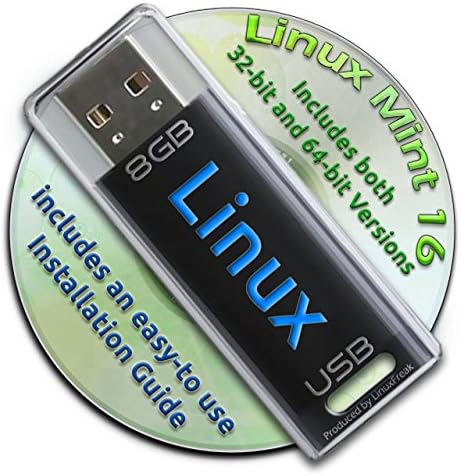
Linux Mint 16 on a Bootable 8GB USB Flash Drive - 32-bit and 64-bit.
61% of respondents would recommend this to a friend
Item #:
10776212
BND 55
Price Details
Excluding Shipping & Custom charges ( Shipping and custom charges will be calculated on checkout )
*All items will import from US
0 ratings
Write a review
In stock
 Imported from USA store
QTY:
Order now and get it around Thursday, October 08
Secured transaction
Ubuy works hard to protect your security and privacy. Our advanced payment security system ensures confidentiality by encrypting your information during transmission using AES (Advanced Encryption Standards) and SSL (Secure Socket Layer) protocols. Your payment details are 100% secure as we do not share your payment details with third party sellers.
Our Top Logistics Partners


Now you can take your Linux Mint installation with you anywhere, and always have your own O/S on any PC you use!

Fast
Shipping

Free
Return*

Secure Packaging

100% Original Products

PCI DSS Compliance

ISO 27001 Certified



Note: Step Down Voltage Transformer required for using electronics products of US store (110-120). Recommended power converters Buy Now.


What Stands Out
Dual Architecture Support
Available in both 32-bit and 64-bit versions, this USB drive caters to a wide range of systems, ensuring compatibility for various users and enhancing accessibility.
Portable Linux Experience
Easy to use and setup as a bootable USB, Linux Mint 16 allows users to carry their OS anywhere, offering seamless access to their favorite tools and applications on different machines.
User-Friendly Interface
With its intuitive design, Linux Mint 16 simplifies navigation for users of all skill levels, making it perfect for newcomers to Linux and those transitioning from other operating systems.
Product Details
| Flash Memory Type | USB |
| Memory Storage Capacity | 8 GB |
| Compatible Devices | Desktop, Laptop |
| Additional Features | Water Proof |
| Hardware Connectivity | USB |
| Item Weight | 2 ounces (56.7 grams) |
| Brand | LinuxFreak |
| Manufacturer | LinuxFreak |
| UPC | 039517839445 |
| Color | Mint |
Who Should Buy?

-
New Linux Users
Linux Mint 16 provides an easy transition for users unfamiliar with Linux, with its user-friendly interface and features.
-
Portable OS Solution
Ideal for users needing a portable operating system to run Linux on multiple computers without installation.
-
System Testers
Great for developers and testers wanting to experiment with Linux Mint without altering their main OS.

-
Gaming Enthusiasts
Linux Mint 16 may not support many popular games, limiting the gaming experience for dedicated users.
Product Description
Linux Mint 16 on a Bootable 8GB USB Flash Drive - 32-bit and 64-bit.
Have any Query? Chat with us
Customer Questions & Answers
-
Question:
What is Linux Mint 16 and what are its system requirements?
Answer: Linux Mint 16 is a user-friendly operating system based on the Ubuntu distribution, designed to offer a familiar and comfortable environment. It typically requires a minimum of 512 MB of RAM and a 1 GHz processor for the 32-bit version and a similar setup with 1 GB of RAM for the 64-bit version. This makes it suitable for both older hardware and modern systems. With a diverse range of software available through its repositories, Linux Mint is ideal for personal and professional use, providing an intuitive interface that caters to both beginners and advanced users. -
Question:
What is a bootable USB flash drive and how does it work?
Answer: A bootable USB flash drive is a portable storage device configured to boot an operating system instead of the standard hard drive when the computer powers on. This is accomplished by creating a special structure on the USB that the computer recognizes during the boot process. Users can install an OS, run live environments, or troubleshoot systems directly from the USB. This functionality is particularly useful for testing out Linux Mint without altering the existing OS on the computer, or for installing it onto the hard drive without needing a CD/DVD drive. -
Question:
Can I use the USB flash drive for both 32-bit and 64-bit versions of Linux Mint 16?
Answer: Yes, the USB flash drive can be prepared to support both 32-bit and 64-bit versions of Linux Mint 16. When creating the bootable USB, you can choose which version to load upon booting. This flexibility allows users with different hardware specifications – whether older systems that require a 32-bit OS or newer systems that can run 64-bit – to benefit from Linux Mint's features. Users can switch between versions based on their current requirements, making it a versatile tool for a variety of users. -
Question:
Is Linux Mint suitable for beginners?
Answer: Absolutely! Linux Mint is particularly well-regarded for its user-friendly interface, which mimics mainstream operating systems, making it easy for beginners to transition from Windows or macOS. Its applications are intuitive, and the community offers extensive support through forums and documentation. These features enable new users to navigate the operating system confidently, install software, and troubleshoot common issues without the steep learning curve usually associated with Linux distributions. -
Question:
What applications come pre-installed with Linux Mint 16?
Answer: Linux Mint 16 comes with a robust suite of pre-installed applications designed to meet common user needs. These include the Firefox web browser, LibreOffice suite for productivity tasks, multimedia players like VLC, and even tools for system maintenance. This extensive offering ensures that users have essential software readily available upon installation, minimizing the need to search for or install additional applications right away, perfect for a seamless start. -
Question:
How can I create my own bootable USB flash drive for Linux Mint 16?
Answer: Creating a bootable USB flash drive for Linux Mint 16 involves several steps. First, you need to download the ISO file of the operating system from the official website. Next, use software such as Rufus or UNetbootin to write the ISO image to the USB drive, ensuring you select the appropriate settings, especially for the intended architecture (32-bit or 64-bit). Once completed, you can boot from the USB drive by adjusting the BIOS or UEFI settings on your computer to prioritize USB booting. This allows you to test or install Linux Mint effortlessly. -
Question:
What are the benefits of using a USB flash drive for Linux Mint over a CD/DVD?
Answer: Using a USB flash drive for Linux Mint installation offers several advantages over traditional CD/DVDs. USB drives can store more data, allow for faster booting times, and are reusable for multiple operating systems or updates. Additionally, many modern computers lack optical drives, making USB the more convenient option. This flexibility enables users to carry multiple OS installations on a single device and quickly boot into different environments based on their needs. -
Question:
Is Linux Mint 16 secure for daily use?
Answer: Yes, Linux Mint 16 is designed with security in mind. The operating system receives regular updates that patch vulnerabilities and enhance system integrity. Additionally, Linux Mint supports effective user permissions and includes built-in tools like the firewall and antivirus options, adding layers of protection against threats. This makes it a viable choice for daily personal computing and sensitive tasks, providing peace of mind while browsing the internet or managing files. -
Question:
Where can I buy Linux Mint 16 on a Bootable 8GB USB Flash Drive - 32-bit and 64-bit in Brunei?
Answer: You can buy Linux Mint 16 on a Bootable 8GB USB Flash Drive - 32-bit and 64-bit on Ubuy. Ubuy offers a seamless shopping experience with various options for Linux Mint, making it easy to find the specific version you need. With user-friendly navigation and reliable service, Ubuy is an excellent choice for acquiring your Linux Mint 16 USB drive.
LinuxFreak USB Flash Drives Editorial Review
No editorial reviews found
Customer Reviews & Ratings
1 customers ratings
-
5 Star
100%
-
4 Star
0%
-
3 Star
0%
-
2 Star
0%
-
1 Star
0%
Review this product
Share your thoughts with other customers
Pros
- User-friendly interface
- Supports both 32-bit and 64-bit
- Fast boot-up and performance
- Excellent community support
- Pre-installed software suite
Platform Trust & Buyer Confidence

JK
Jasmin
Verified buyer
“Great products and very good service: very easy and very fast international delivery.”
9 September 2026 · via Trustpilot
AG
Anke
Verified buyer
“Wonderful online shopping experience, smooth transaction from the start. Payment method works conveniently and delivery is unexpectedly fast and reliable. You go the extra mile for service. What makes this even more amazing, you deliver to Namibia. I will remain a happy Ubuy customer and will increase my purchases for sure! Thank you!”
10 September 2026 · via Trustpilot
H
Hazel
Verified buyer
“Very easy to find the products what you need, and so fast delivery, that’s why I highly recommended to others costumers to used ubuy.”
10 September 2026 · via Trustpilot
O
Opaleye
Verified buyer
“I received exactly what I ordered I was skeptical about your site because that was my first time to order. But the order came timely and neatly packaged. I was not disappointed. Thank you.”
11 September 2026 · via Trustpilot
AC
Adele
Verified buyer
“Easy to find and order what you want on the website. Delivery is quick to the UK”
8 September 2026 · via Trustpilot
Secure Checkout
Global Delivery
Easy Returns
Genuine Products
Product Price History
Important information
- Limitations : For products shipped internationally, please note that any manufacturer warranty may not be valid; manufacturer service options may not be available; product manuals, instructions, and safety warnings may not be in destination country languages; the products (and accompanying materials) may not be designed in accordance with destination country standards, specifications, and labeling requirements; and the products may not conform to destination country voltage and other electrical standards (requiring use of an adapter or converter if appropriate). The recipient is responsible for assuring that the product can be lawfully imported to the destination country. When ordering from Ubuy or its affiliates, the recipient is the importer of record and must comply with all laws and regulations of the destination country.
- Not all the products listed on Ubuy are for sale, as Ubuy is a global search engine. Products are subject to export/trade regulations.
BND 55
Order now and get it around Thursday, October 08
This item is not restrict in my country.(Please click on above link if this item is not restrict in your country, So our team will review and allow.)
QTY:
Secured transaction
PCI DSS compliant and ISO 27001:2022 certified, with encrypted payments and full buyer protection on every order.
Our Top Logistics Partners
Fastest cross-border delivery
Features & Benefits
- Boot and load Linux without altering your current Windows setup.
- Includes both 32-bit and 64-bit versions preinstalled.
- Portable solution for having your own operating system on any PC.
- Award-winning Linux Mint with a full set of applications included.
- Lifetime free updates and multi-language support for your convenience.
- Comes with an easy-to-follow installation guide with pictures.
Ubuy Assurance
Experience worry-free shopping with 100% original products, PCI DSS-compliant payment security, ISO 27001-certified data protection, the fastest cross-border delivery, free returns *, and secure packaging on every order.