0 ratings

Item #:
66285807
KVM Switch 2 Monitors 2 Computers DisplayPort, MST Smart Chip Dual Monitor KVM Switches Ensure 1 DP Connection Achive 2 Monitors Display, A Supper
Item #:
66285807
BND 72
Price Details
Excluding Shipping & Custom charges ( Shipping and custom charges will be calculated on checkout )
*All items will import from US
0 ratings
Write a review
Out of stock
 Imported from USA store
Secured transaction
Ubuy works hard to protect your security and privacy. Our advanced payment security system ensures confidentiality by encrypting your information during transmission using AES (Advanced Encryption Standards) and SSL (Secure Socket Layer) protocols. Your payment details are 100% secure as we do not share your payment details with third party sellers.
Our Top Logistics Partners


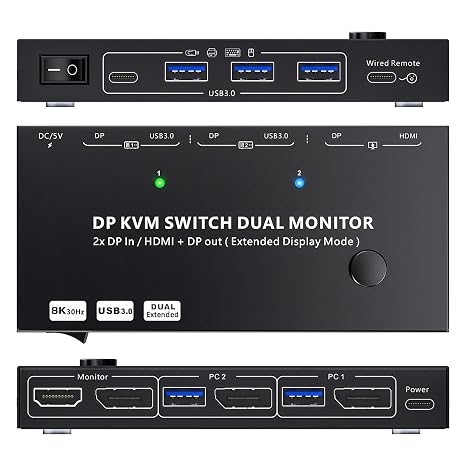
This DP KVM switch allows you to connect 2 DP port computers to share 2 monitors (DP + HDMI).

Fast
Shipping

Free
Return*

Secure Packaging

100% Original Products

PCI DSS Compliance

ISO 27001 Certified


Note: Step Down Voltage Transformer required for using electronics products of US store (110-120). Recommended power converters Buy Now.


What Stands Out
Dual Monitor Support
Seamlessly connect two computers to two monitors, enhancing multitasking capabilities and providing an immersive visual experience for users demanding high productivity.
4K@60Hz Resolution
Delivers stunning 4K@60Hz video quality, ensuring crisp visuals and smooth performance for gamers, graphic designers, and anyone else who prioritizes high-resolution displays.
USB Device Sharing
Efficiently share a single keyboard and mouse between two computers, streamlining your workspace and reducing clutter while increasing convenience for users with multiple systems.
Product Details
| Item Weight | 1.5 lbs (680 grams) |
Who Should Buy?

-
Tech Professionals
Ideal for IT professionals who require seamless switching between multiple computers and monitors for efficiency.
-
Gamers
Perfect for gamers who want to connect multiple systems and use dual monitors for an immersive experience.
-
Designers
Benefits graphic designers needing dual monitors for improved multitasking and enhanced productivity while working on projects.

-
Casual Users
Not ideal for users who only occasionally switch between computers as simplicity might suffice over advanced features.
-
Single Monitor Setups
Users with a single monitor setup will not benefit from the dual monitor capabilities of this switch.
-
Budget-Conscious Buyers
Individuals looking for a low-cost solution may find this KVM switch too expensive for their needs.
Product Description
KVM Switch 2 Monitors 2 Computers DisplayPort, MST Smart Chip Dual Monitor KVM Switches Ensure 1 DP Connection Achive 2 Monitors Display, A Supper Stable and Convenient KVM Switcher
Have any Query? Chat with us
Customer Questions & Answers
-
Question:
What is a DP HDMI KVM switch and how does it work?
Answer: A DP HDMI KVM switch allows you to control multiple computers using a single keyboard and mouse while using dual monitors for better visual output. By connecting two computers to the switch and then connecting the switch to dual monitors, you can seamlessly toggle between computers quickly. This setup is ideal for multitasking or when managing different tasks across both systems without the need for multiple setups. -
Question:
What are the supported resolutions for the DP HDMI KVM switch?
Answer: The DP HDMI KVM switch supports resolutions up to 4K at 60Hz, providing crystal-clear visuals suitable for gaming, graphic design, and video editing. This high resolution ensures that your dual monitors deliver sharp and vibrant images, catering to users who demand clarity and detail in their visual displays. Perfect for professionals and enthusiasts alike, this feature enhances work efficiency and enjoyment. -
Question:
Can I use this KVM switch with macOS and Windows operating systems?
Answer: Yes, this KVM switch is compatible with both macOS and Windows operating systems, making it versatile for various setups. Whether you’re using Macs for creative tasks or PCs for gaming and general use, this device facilitates smooth transitions between systems without needing to reconfigure settings. This flexibility is beneficial for users who operate in mixed-OS environments. -
Question:
Do I need additional cables to set up the KVM switch?
Answer: Typically, the DP HDMI KVM switch requires DisplayPort and USB cables to connect to the computers and monitors. However, check the packaging for any included cables or additional needs. Having the right cables ensures a proper setup and optimal performance, eliminating potential connectivity issues that could hinder your work or gaming sessions. -
Question:
What type of devices can I connect to the KVM switch?
Answer: You can connect a variety of devices such as desktops, laptops, and workstations equipped with DisplayPort or HDMI outputs to the KVM switch. This compatibility extends to both Windows and macOS computers, enabling a broad range of professional applications and personal uses. Whether you're a gamer toggling between consoles or a professional juggling various projects, this switch accommodates your needs. -
Question:
How do I switch between computers using the KVM switch?
Answer: Switching between computers on the KVM switch can typically be done through a physical button on the device or via keyboard shortcuts, depending on the model. This feature allows quick access to either computer without complicated setups. For example, if you are working on a presentation on one computer while taking notes on another, you can easily toggle back and forth without losing momentum. -
Question:
Is the KVM switch plug-and-play?
Answer: Yes, the DP HDMI KVM switch is designed to be plug-and-play, meaning you can set it up quickly without complicated installation processes or external drivers. Just connect your computers and monitors, and you’re ready to go. This convenience is particularly advantageous for users who may not be tech-savvy or those who require quick setups in different environments. -
Question:
Can I use USB peripherals with the KVM switch?
Answer: Absolutely! The KVM switch supports USB connections, allowing you to share peripherals like keyboards, mice, and even printers between the two computers. You simply plug your USB devices into the switch, and they become accessible to both systems. This is especially useful for users who want to simplify their desk setup and avoid clutter from multiple peripherals. -
Question:
How can I buy the DP HDMI KVM switch?
Answer: You can buy the DP HDMI KVM switch from Ubuy. They offer a reliable platform for purchasing tech products, ensuring a secure transaction and a wide selection of devices. By choosing Ubuy, you can confidently add this essential piece of technology to your setup, enhancing your productivity across multiple devices. -
Question:
Is there a specific setup requirement for using dual monitors?
Answer: To effectively use dual monitors with the KVM switch, ensure that both computers have graphic outputs compatible with the switch, either via DisplayPort or HDMI connectors. Also, your monitors should support the required resolutions. This setup allows for a richer experience in multitasking, enabling various applications to be active across both displays, catering to tasks that demand higher productivity.
KCEVE KVM Switches Editorial Review
**** The DP HDMI KVM Switch has found its place as a versatile tool in the home office and gaming setups, as reflected in numerous customer experiences. Users appreciate its ability to effortlessly switch between two computers, allowing for seamless multitasking. Reviewers highlight the product’s straightforward setup process, noting that it can easily connect two computers to two monitors, outlining the practicality for both work-from-home setups and personal gaming systems. However, the feedback is mixed regarding the device's reliability over time. While many users report that the KVM switch functions efficiently without issues, some have experienced technical problems after a few months of use, particularly with the switch button becoming unresponsive and display issues where only one monitor would work at a time. Despite these concerns, the KVM switch maintains a strong functionality for users managing dual displays, and many express satisfaction with the clarity and responsiveness of the screen output. The inclusion of a remote switch button also adds convenience, and the capability to connect additional USB devices reflects thoughtful design. In summary, the KVM switch is generally well-received for its functionality and ease of use, despite some longevity concerns that may affect the recommendation for long-term use. **
Customer Reviews & Ratings
1 customers ratings
-
5 Star
100%
-
4 Star
0%
-
3 Star
0%
-
2 Star
0%
-
1 Star
0%
Review this product
Share your thoughts with other customers
Pros
- Easy to set up and switch between two computers
- Supports dual monitors, enhancing productivity
- Maintains clarity and responsiveness of screens
- Convenient remote switch button included
- Additional USB ports for connecting other devices
Cons
- Problems with the switch button becoming unresponsive
Product Price History
Important information
- Limitations : For products shipped internationally, please note that any manufacturer warranty may not be valid; manufacturer service options may not be available; product manuals, instructions, and safety warnings may not be in destination country languages; the products (and accompanying materials) may not be designed in accordance with destination country standards, specifications, and labeling requirements; and the products may not conform to destination country voltage and other electrical standards (requiring use of an adapter or converter if appropriate). The recipient is responsible for assuring that the product can be lawfully imported to the destination country. When ordering from Ubuy or its affiliates, the recipient is the importer of record and must comply with all laws and regulations of the destination country.
- Not all the products listed on Ubuy are for sale, as Ubuy is a global search engine. Products are subject to export/trade regulations.
BND 72
Currently unavailable.
We don't know when or if this item will be back in stock.
This item is not restrict in my country.(Please click on above link if this item is not restrict in your country, So our team will review and allow.)
Secured transaction
Ubuy works hard to protect your security and privacy. Our advanced payment security system ensures confidentiality by encrypting your information during transmission using AES (Advanced Encryption Standards) and SSL (Secure Socket Layer) protocols. Your payment details are 100% secure as we do not share your payment details with third party sellers.
Our Top Logistics Partners
Fastest cross-border delivery
Features & Benefits
- Upgraded technology by KCEVE
- Supports 2 display modes: duplicate and mirror
- Includes 4 USB 3.0 ports for sharing peripherals
- Supports physical button and wired control switching modes
- Ideal for computers with dual or multi-display capability
- Not compatible with Mac M1 for extend display