- Home Page /
- Mobile Phone Accessories /
- Mobile Phone Accessories /
- Maintenance, Upkeep & Repairs /
- SIM Card Tools & Accessories /
- Cellphone Parts for OnePlus 8 Power Button & ...
0 ratings






Item #:
99543807
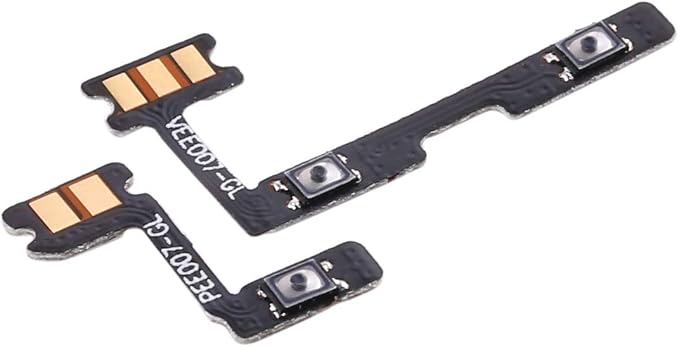
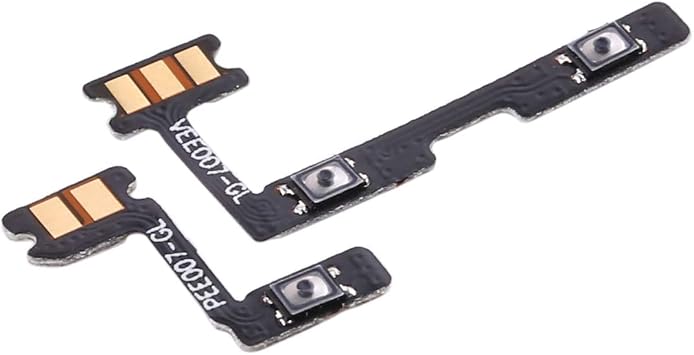
Cellphone Parts for OnePlus 8 Power Button & Volume Button Flex Cable
Item #:
99543807
BND 21
Price Details
Excluding Shipping & Custom charges ( Shipping and custom charges will be calculated on checkout )
*All items will import from US
0 ratings
Write a review
In stock
 Imported from USA store
QTY:
Order now and get it around Tuesday, October 13
Secured transaction
Ubuy works hard to protect your security and privacy. Our advanced payment security system ensures confidentiality by encrypting your information during transmission using AES (Advanced Encryption Standards) and SSL (Secure Socket Layer) protocols. Your payment details are 100% secure as we do not share your payment details with third party sellers.
Our Top Logistics Partners


Replace your broken or unworkable item with a new one.

Fast
Shipping

Free
Return*

Secure Packaging

100% Original Products

PCI DSS Compliance

ISO 27001 Certified



Note: Step Down Voltage Transformer required for using electronics products of US store (110-120). Recommended power converters Buy Now.


What Stands Out
Durable Construction
Built with high-quality materials to ensure longevity, this flex cable withstands daily wear and tear, providing reliable performance for your OnePlus 8 timeframe.
Perfect Fit
Engineered specifically for the OnePlus 8, this flex cable guarantees precise compatibility, making installation seamless without the need for extensive adjustments or modifications.
Enhanced Functionality
Restores full control over your device's power and volume functions, solving common issues users face with unresponsive buttons, thus improving overall user experience.
Product Details
| Compatible Devices | Smartphone |
| Connector Gender | Male-to-Female |
| Unit Count | 1 Count |
| Item Weight | 0.02 kg |
| Item Shape | Round |
| Manufacturer | WANGJIANBO |
| Part Number | WANGJIANBO-63 |
| Shape | Round |
Who Should Buy?

-
DIY Repair Enthusiasts
Individuals who enjoy repairing their devices will appreciate the ease of installation and cost-effectiveness.
-
Cost-Sensitive Users
People looking to save money on repairs will find this flex cable a budget-friendly option for fixing issues.
-
OnePlus 8 Owners
Current OnePlus 8 users facing button malfunctions will benefit from this replacement part to restore functionality.

-
Non-Technical Users
Those who lack technical skills may struggle with installation and prefer professional repair services instead.
Product Description
Have any Query? Chat with us
Customer Questions & Answers
-
Question:
What are the benefits of replacing the power button and volume button flex cable on my OnePlus 8?
Answer: Replacing the power button and volume button flex cable can significantly improve the functionality of your OnePlus 8. This replacement is essential if you're experiencing unresponsive buttons or intermittent performance. By fixing these issues, you’ll regain full control over your device, including the ability to power on/off, adjust volume levels, and more. If your phone has been dropped or has liquid damage, these symptoms can emerge, making the replacement crucial for restoring normal operation. -
Question:
How do I know if I need to replace my OnePlus 8's flex cable?
Answer: Indicators that you may need to replace the flex cable include unresponsive buttons or inconsistent button performance. If you're pressing the power or volume button and the phone does not respond, it's likely the flex cable has been damaged. Additionally, if you notice that some functions are activating spontaneously, a malfunctioning flex cable could be the cause. Performing a simple test by trying to use the buttons in various situations can help determine if it’s time to replace them. -
Question:
Can I install the power button and volume button flex cable myself?
Answer: Yes, many users choose to replace the flex cable themselves, provided they have basic technical skills and the right tools. The installation typically involves disassembling your OnePlus 8 and carefully replacing the cable. There are numerous online guides and videos to assist you through the process step-by-step. However, if you're not comfortable with electronics or don’t have the necessary tools, consulting a professional repair service might be a better option. -
Question:
What tools do I need to replace the OnePlus 8 flex cable?
Answer: To replace the power button and volume button flex cable, you'll need a set of precision tools commonly used for phone repairs. This includes a small Phillips screwdriver, a spudger, tweezers, and possibly a suction cup if you're lifting the display. Using these tools, you can carefully open your device and access the necessary components. Ensure that you keep track of all screws and components during the process to avoid any loss. -
Question:
What should I do if my OnePlus 8 buttons are still unresponsive after replacing the flex cable?
Answer: If your buttons remain unresponsive after replacing the flex cable, this could indicate deeper hardware issues or improper installation. Double-check your installation to ensure everything is connected correctly and there are no loose parts. It's also possible that the issue resides within the motherboard or other components. If problems persist, seeking help from a qualified technician can provide more insight into any potential underlying issues. -
Question:
How can I prolong the lifespan of my OnePlus 8's buttons?
Answer: To prolong the lifespan of your OnePlus 8's buttons, handle your device with care, avoiding drops or extreme pressure on the buttons. Regularly clean around the buttons to prevent dust and debris buildup, which can affect performance. Additionally, consider using a protective case that absorbs shocks and offers a cushion in case of drops, ultimately preserving the integrity of the flex cable and buttons. -
Question:
Is the OnePlus 8 flex cable compatible with other OnePlus models?
Answer: No, the OnePlus 8 flex cable is specifically designed for the OnePlus 8 model and is not compatible with other models. Each OnePlus device has unique specifications, and using a flex cable from a different model could result in improper function or damage. When purchasing parts, always ensure that you select the correct model to ensure compatibility and optimal performance. -
Question:
What signs indicate a faulty flex cable in the OnePlus 8?
Answer: Signs of a faulty flex cable in your OnePlus 8 include intermittent responsiveness of the power and volume buttons or buttons that do not function at all. You may also notice that the buttons respond when pressed very hard or after multiple attempts. In some cases, erratic behavior such as the device turning on/off by itself may occur due to a damaged cable. Observing these symptoms closely can guide you toward making a replacement decision. -
Question:
How can I test the performance of my OnePlus 8 buttons?
Answer: To test the performance of your OnePlus 8 buttons, try engaging each button while the device is powered on. Check if the power button successfully turns the screen on/off and if the volume buttons adjust the sound level promptly. Test the buttons in various apps and scenarios. Noticing any hesitation or failure to respond can help determine if your flex cable needs replacement. Conducting a test during different functions helps provide a comprehensive assessment. -
Question:
Where can I buy Cellphone Parts for OnePlus 8 Power Button & Volume Button Flex Cable in Brunei?
Answer: You can buy Cellphone Parts for OnePlus 8 Power Button & Volume Button Flex Cable from Ubuy in Brunei. Ubuy offers a variety of cellphone parts and components, ensuring that you can find genuine replacements for your device. With their extensive selection, you can easily source the high-quality flex cable you need for your OnePlus 8, making it a reliable destination for your repairs and parts.
WANGJIANBO SIM Card Tools & Accessories Editorial Review
No editorial reviews found
Customer Reviews & Ratings
1 customers ratings
-
5 Star
0%
-
4 Star
100%
-
3 Star
0%
-
2 Star
0%
-
1 Star
0%
Review this product
Share your thoughts with other customers
Platform Trust & Buyer Confidence

JK
Jasmin
Verified buyer
“Great products and very good service: very easy and very fast international delivery.”
9 September 2026 · via Trustpilot
AG
Anke
Verified buyer
“Wonderful online shopping experience, smooth transaction from the start. Payment method works conveniently and delivery is unexpectedly fast and reliable. You go the extra mile for service. What makes this even more amazing, you deliver to Namibia. I will remain a happy Ubuy customer and will increase my purchases for sure! Thank you!”
10 September 2026 · via Trustpilot
H
Hazel
Verified buyer
“Very easy to find the products what you need, and so fast delivery, that’s why I highly recommended to others costumers to used ubuy.”
10 September 2026 · via Trustpilot
O
Opaleye
Verified buyer
“I received exactly what I ordered I was skeptical about your site because that was my first time to order. But the order came timely and neatly packaged. I was not disappointed. Thank you.”
11 September 2026 · via Trustpilot
AC
Adele
Verified buyer
“Easy to find and order what you want on the website. Delivery is quick to the UK”
8 September 2026 · via Trustpilot
Secure Checkout
Global Delivery
Easy Returns
Genuine Products
Product Price History
Important information
- Limitations : For products shipped internationally, please note that any manufacturer warranty may not be valid; manufacturer service options may not be available; product manuals, instructions, and safety warnings may not be in destination country languages; the products (and accompanying materials) may not be designed in accordance with destination country standards, specifications, and labeling requirements; and the products may not conform to destination country voltage and other electrical standards (requiring use of an adapter or converter if appropriate). The recipient is responsible for assuring that the product can be lawfully imported to the destination country. When ordering from Ubuy or its affiliates, the recipient is the importer of record and must comply with all laws and regulations of the destination country.
- Not all the products listed on Ubuy are for sale, as Ubuy is a global search engine. Products are subject to export/trade regulations.
BND 21
Order now and get it around Tuesday, October 13
This item is not restrict in my country.(Please click on above link if this item is not restrict in your country, So our team will review and allow.)
QTY:
Secured transaction
PCI DSS compliant and ISO 27001:2022 certified, with encrypted payments and full buyer protection on every order.
Our Top Logistics Partners
Fastest cross-border delivery
Features & Benefits
- Perfect replacement for OnePlus 8's volume and power button flex cable.
- High-quality assurance with thorough checks before shipping.
- Easy installation for restoring functionality.
- Professional installation is recommended for best results.
- Great value for money in mobile phone parts.
- Contact us for any quality or delivery issues before installation.
Ubuy Assurance
Experience worry-free shopping with 100% original products, PCI DSS-compliant payment security, ISO 27001-certified data protection, the fastest cross-border delivery, free returns *, and secure packaging on every order.