- Home Page /
- Electronics /
- GPS, Finders & Accessories /
- Vehicle GPS /
- Garmin Drive 52 EX, GPS Navigator with 5 Display, Simpl...
0 ratings


Item #:
90713258
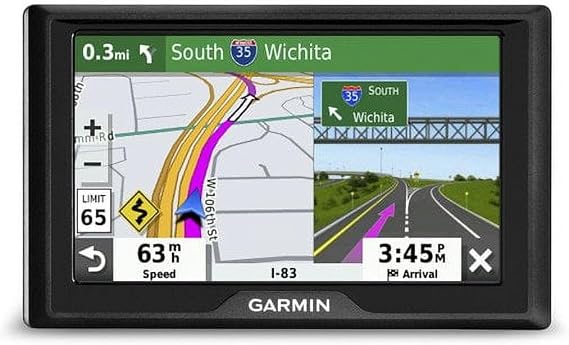
Garmin Drive 52 EX, GPS Navigator with 5 Display, Simple On-Screen Menus and Easy-to-See Maps
86% of respondents would recommend this to a friend
Item #:
90713258
BND 228
Price Details
Excluding Shipping & Custom charges ( Shipping and custom charges will be calculated on checkout )
*All items will import from US
0 ratings
Write a review
In stock
 Imported from USA store
QTY:
Order now and get it around Sunday, October 11
Secured transaction
Ubuy works hard to protect your security and privacy. Our advanced payment security system ensures confidentiality by encrypting your information during transmission using AES (Advanced Encryption Standards) and SSL (Secure Socket Layer) protocols. Your payment details are 100% secure as we do not share your payment details with third party sellers.
Our Top Logistics Partners


Road trip-ready with The HISTORY Channel database of notable historic sites and millions of Foursquare points of interest.

Fast
Shipping

Free
Return*

Secure Packaging

100% Original Products

PCI DSS Compliance

ISO 27001 Certified



Note: Step Down Voltage Transformer required for using electronics products of US store (110-120). Recommended power converters Buy Now.


What Stands Out
User-Friendly Interface
The Garmin Drive 52 EX features simple on-screen menus, ensuring effortless navigation for users of all tech levels, making it ideal for families and seniors alike.
Vibrant 5-Inch Display
With a clear and bright 5-inch display, this GPS navigator offers easy-to-read maps and directions, enhancing visibility during all lighting conditions for safer driving.
Comprehensive Map Coverage
Preloaded with detailed maps, the Garmin Drive 52 EX minimizes the need for updates, providing users with accurate and reliable navigation across diverse terrains.
Product Details
| Compatible with Vehicle Type | Car |
| Screen Size | 5 inches |
| Additional Features | Touchscreen |
| Connectivity Technology | USB |
| Map Types | Road |
| Mounting Type | Windshield Mount |
| Resolution | 480 x 272 |
| Operating System | Windows Ce |
| Touch Screen Type | Capacitive |
| Display Type | Touchscreen |
| Human-Interface Input | Touchscreen |
| Compatible Devices | Smartphone, Tablet |
| Control Method | Touch |
| Supported Satellite Navigation System | GPS |
| Software Update Supported to Date | unknown |
| Brand | Garmin |
| Model Name | Drive 52 EX |
| Built-In Media | Garmin Drive 52 EX, vehicle suction cup mount, vehicle power cable, USB cable, quick start manual |
| UPC | 753759283544 |
| Manufacturer | Garmin |
| Number of Items | 1 |
| Unit Count | 1 Count |
| Item Dimensions L x W x H | 5"L x 5"W x 5"H (12.7 x 12.7 x 12.7 cm) |
| Vehicle Service Type | Car |
| Special Feature | Touchscreen |
| Map Type | Road |
| Included Components | Garmin Drive 52 EX, vehicle suction cup mount, vehicle power cable, USB cable, quick start manual |
Who Should Buy?

-
Casual Drivers
Ideal for everyday navigation with simple menus and easy-to-see maps, perfect for stress-free travel.
-
Road Trip Enthusiasts
Great for long journeys; the large display and detailed maps enhance navigation experiences on the road.
-
Elderly Users
User-friendly interface and clear visuals make it suitable for seniors who prefer straightforward technology.

-
Tech Savvy Users
Advanced features may be limited; experienced users might prefer more sophisticated GPS systems for customization.
Product Description
Garmin Drive 52 EX, GPS Navigator with 5 Display, Simple On-Screen Menus and Easy-to-See Maps
Have any Query? Chat with us
Customer Questions & Answers
-
Question:
What features does the Garmin Drive 52 EX offer?
Answer: The Garmin Drive 52 EX GPS Navigator comes equipped with a vibrant 5-inch display that provides clear and easy-to-read maps. It offers simple on-screen menus that enhance user experience by allowing intuitive navigation. This model provides real-time traffic updates, points of interest, and voice prompts that ensure you stay informed during your journey. Ideal for both daily commuting and long road trips, its user-friendly interface makes it suitable for all drivers, whether you're exploring new areas or just navigating your regular routes. -
Question:
How does the Garmin Drive 52 EX improve road navigation?
Answer: The Garmin Drive 52 EX significantly enhances road navigation through its advanced mapping technology and features. With clear maps and detailed information, you can easily find your way to destinations, avoiding missed turns and dead ends. The device also includes lane assist and junction view, guiding you on which lane to be in as you approach exits and interchanges. This makes it particularly beneficial for unfamiliar routes or heavy traffic situations, ensuring you arrive at your destination safely and efficiently. -
Question:
Can the Garmin Drive 52 EX be updated?
Answer: Yes, the Garmin Drive 52 EX allows for map and software updates to ensure you have the most current road data. Users can easily connect the device to a computer and use the Garmin Express application to download updates periodically. Keeping your device updated is crucial as it improves navigation accuracy and adds new points of interest. This is especially valuable when planning trips through evolving urban landscapes or areas experiencing rapid development. -
Question:
Is the Garmin Drive 52 EX suitable for truck drivers?
Answer: While the Garmin Drive 52 EX is designed primarily for passenger vehicles, it can be utilized by truck drivers for standard routing and directions. However, specific truck routing features, such as height and weight restrictions, may not be available. Truck drivers looking for advanced navigational features tailored to larger vehicles might consider other Garmin models specifically built for commercial use. Nonetheless, the 5-inch display and straightforward navigation can still assist in day-to-day road travel. -
Question:
What type of battery does the Garmin Drive 52 EX use?
Answer: The Garmin Drive 52 EX operates on an internal rechargeable battery designed to provide sufficient power for long drives without frequent recharging. Though it is primarily used while plugged into a vehicle’s power outlet, the battery ensures that it can temporarily function without a direct power source. This feature is advantageous during unexpected stops or when needing to transfer the device to another vehicle without immediate access to power. -
Question:
How do I mount the Garmin Drive 52 EX in my vehicle?
Answer: The Garmin Drive 52 EX comes with a simple suction cup mount that can be easily attached to your windshield or dashboard. The mount allows for adjustable viewing angles to ensure optimal visibility while driving. Proper placement is important for both safety and ease of use; ensure that it does not obstruct your view of the road. This flexibility makes it convenient for users across various vehicle types and helps facilitate an unhindered driving experience. -
Question:
Does the Garmin Drive 52 EX support voice commands?
Answer: Yes, the Garmin Drive 52 EX supports voice prompts, allowing hands-free navigation. While it may not have advanced voice command features for input, it provides audible directions, ensuring drivers can focus on the road without distraction. This feature is particularly useful in busy traffic conditions or when driving in unfamiliar areas, as it helps keep your attention where it belongs—on driving. -
Question:
Where can I buy Garmin Drive 52 EX in Brunei?
Answer: You can purchase the Garmin Drive 52 EX GPS Navigator from Ubuy, which offers a variety of electronics and gadgets. Ubuy provides a reliable platform for acquiring this device, ensuring a smooth transaction process with a vast selection of items shipped to Brunei. Whether you're looking for additional features or related accessories, Ubuy simplifies your shopping experience while delivering quality products. -
Question:
What is the map coverage on the Garmin Drive 52 EX?
Answer: The Garmin Drive 52 EX features comprehensive map coverage of North America, including major highways, byways, and thousands of points of interest. The device allows for detailed navigation, ensuring you can easily find your way to various locations. Whether you're planning a road trip across states or exploring local sightseeing options, the extensive map coverage enhances your travel experience. Regular updates will also help you keep up with changes in routes and landmarks. -
Question:
What should I do if my Garmin Drive 52 EX malfunctions?
Answer: In the event of a malfunction, first, try restarting the device by holding down the power button. If issues persist, check for software updates via Garmin Express to resolve any glitches. For persistent problems, referring to the user manual or visiting Garmin’s support page can provide guidance. Many users find that troubleshooting simple issues themselves ensures a smoother experience, allowing them to rely on their GPS for navigation without significant delays.
Garmin Vehicle GPS Editorial Review
Garmin Drive 52 EX, GPS Navigator with 5 Display, Simple On-Screen Menus and Easy-to-See Maps; the unit features a 5-inch capacitive touchscreen, providing easy navigation without excessive glances while driving. Some users have pointed out concerns about outdated maps or connectivity issues for updates, but they often stem from specific network restrictions rather than the device itself. Many have found it durable, suitable for various vehicles, and appreciate the ease of use with the touchscreen interface. As one reviewer noted, this unit is particularly effective when mounted properly, making long rides more manageable.
Customer Reviews & Ratings
1 customers ratings
-
5 Star
100%
-
4 Star
0%
-
3 Star
0%
-
2 Star
0%
-
1 Star
0%
Review this product
Share your thoughts with other customers
Pros
- 5-inch touchscreen for easy navigation
- Durable for long motorcycle rides
- Compatible with various vehicles
- User-friendly simple on-screen menus
- Quick start manual included
Cons
- Minor difficulty in initial setup for some users
Platform Trust & Buyer Confidence

JK
Jasmin
Verified buyer
“Great products and very good service: very easy and very fast international delivery.”
9 September 2026 · via Trustpilot
AG
Anke
Verified buyer
“Wonderful online shopping experience, smooth transaction from the start. Payment method works conveniently and delivery is unexpectedly fast and reliable. You go the extra mile for service. What makes this even more amazing, you deliver to Namibia. I will remain a happy Ubuy customer and will increase my purchases for sure! Thank you!”
10 September 2026 · via Trustpilot
H
Hazel
Verified buyer
“Very easy to find the products what you need, and so fast delivery, that’s why I highly recommended to others costumers to used ubuy.”
10 September 2026 · via Trustpilot
O
Opaleye
Verified buyer
“I received exactly what I ordered I was skeptical about your site because that was my first time to order. But the order came timely and neatly packaged. I was not disappointed. Thank you.”
11 September 2026 · via Trustpilot
AC
Adele
Verified buyer
“Easy to find and order what you want on the website. Delivery is quick to the UK”
8 September 2026 · via Trustpilot
Secure Checkout
Global Delivery
Easy Returns
Genuine Products
Product Price History
Important information
- Limitations : For products shipped internationally, please note that any manufacturer warranty may not be valid; manufacturer service options may not be available; product manuals, instructions, and safety warnings may not be in destination country languages; the products (and accompanying materials) may not be designed in accordance with destination country standards, specifications, and labeling requirements; and the products may not conform to destination country voltage and other electrical standards (requiring use of an adapter or converter if appropriate). The recipient is responsible for assuring that the product can be lawfully imported to the destination country. When ordering from Ubuy or its affiliates, the recipient is the importer of record and must comply with all laws and regulations of the destination country.
- Not all the products listed on Ubuy are for sale, as Ubuy is a global search engine. Products are subject to export/trade regulations.
BND 228
Order now and get it around Sunday, October 11
This item is not restrict in my country.(Please click on above link if this item is not restrict in your country, So our team will review and allow.)
QTY:
Secured transaction
PCI DSS compliant and ISO 27001:2022 certified, with encrypted payments and full buyer protection on every order.
Our Top Logistics Partners
Fastest cross-border delivery
Features & Benefits
- 5” GPS navigator perfect for road trips.
- Includes North America map updates and driver alerts.
- Spoken turn-by-turn directions using street names and landmarks.
- Up Ahead feature for easy access to upcoming stops.
- Includes databases for historic sites, national parks, and traveler ratings.
- User-friendly with bright, easy-to-read maps and simple menus.
Ubuy Assurance
Experience worry-free shopping with 100% original products, PCI DSS-compliant payment security, ISO 27001-certified data protection, the fastest cross-border delivery, free returns *, and secure packaging on every order.