- Home Page /
- Musical Instruments /
- Studio Equipments /
- Computer Recording Equipment /
- Digital Audio Workstation Controllers /
- Gugxiom Stream Controller Studio, Studio Cont...
0 ratings


Item #:
117689743
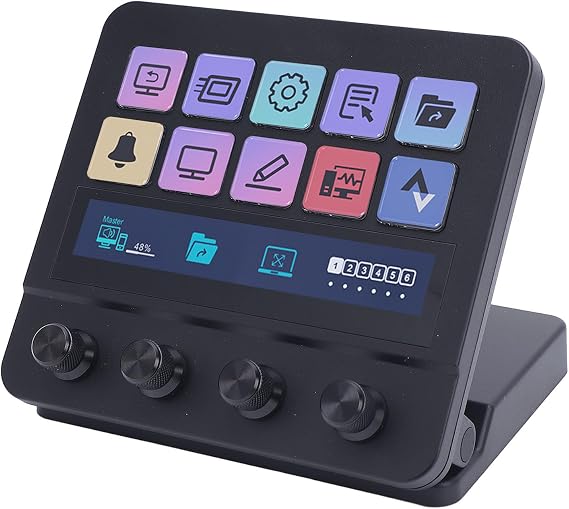
Gugxiom Stream Controller Studio, Studio Control Deck with 10 Macro Keys and Dashboard Customizable LCD Buttons, for OBS Twitch, for PC
80% of respondents would recommend this to a friend
Item #:
117689743
BND 255
Price Details
Excluding Shipping & Custom charges ( Shipping and custom charges will be calculated on checkout )
*All items will import from US
0 ratings
Write a review
In stock
 Imported from USA store
QTY:
Order now and get it around Tuesday, October 13
Secured transaction
Ubuy works hard to protect your security and privacy. Our advanced payment security system ensures confidentiality by encrypting your information during transmission using AES (Advanced Encryption Standards) and SSL (Secure Socket Layer) protocols. Your payment details are 100% secure as we do not share your payment details with third party sellers.
Our Top Logistics Partners


Take control of your apps, tools, and platforms with ease using 10 customizable LCD keys, eliminating the need to switch window.

Fast
Shipping

Free
Return*

Secure Packaging

100% Original Products

PCI DSS Compliance

ISO 27001 Certified



Note: Step Down Voltage Transformer required for using electronics products of US store (110-120). Recommended power converters Buy Now.


What Stands Out
10 Macro Keys
Easily program and execute multiple commands with 10 customizable macro keys, streamlining your live broadcasts and enhancing efficiency on platforms like OBS, Twitch, and YouTube.
Customizable LCD
Interactive dashboard with LCD buttons that you can customize for quick access to essential controls, allowing for a personalized streaming experience tailored to your specific needs.
PC Compatibility
Wide compatibility with PC, ensuring seamless integration into your existing streaming setup and providing a hassle-free experience for both novice and professional content creators.
Product Details
| Compatible Devices | Mac, PC |
| Connectivity Technology | USB |
| Power Source | USB Powered |
| Keyboard Layout | Maltron |
| Hand Orientation | Ambidextrous |
| Button Quantity | 10 |
| Number of Keys | 10 |
| Brand | Gugxiom |
| Keyboard Description | Multi Functional |
| Built-In Media | USB Cable |
| Model Number | Gugxiom4fe5vmgdkr |
| Model Name | Gugxiom4fe5vmgdkr |
| Unit Count | 1 Count |
| Manufacturer | Gugxiom |
| Item Type Name | Keyboards |
| Mfr Part Number | Gugxiom4fe5vmgdkr |
| Included Components | USB Cable |
| Keyboard layout | Maltron |
| Number of Buttons | 10 |
| Item Weight | 2.5 lbs (1.13 kg) |
Who Should Buy?

-
Live Streamers
Ideal for individuals streaming on Twitch or YouTube, allowing instant control over various streaming functions.
-
Content Creators
Perfect for podcasters and video editors who need quick access to macros and custom commands.
-
Gamers
Great for gamers who want to simplify their streaming workflow and enhance viewer engagement with macro controls.

-
Casual Users
Not suitable for occasional users who don't require complex controls or automation in their streams.
Product Description
Gugxiom Stream Controller Studio, Studio Control Deck with 10 Macro Keys and Dashboard Customizable LCD Buttons, for OBS Twitch, for PC
Have any Query? Chat with us
Customer Questions & Answers
-
Question:
What is the Gugxiom Stream Controller Studio used for?
Answer: The Gugxiom Stream Controller Studio is designed for streamers and content creators, allowing them to efficiently manage their streaming setup. It features 10 macro keys and customizable LCD buttons, making it versatile for tasks like switching scenes, adjusting audio, or triggering specific commands in OBS. This functionality enhances the streaming experience by providing quick access to frequently used tools and settings. For instance, a gamer could set a macro key to mute audio instantly during a live stream, creating a seamless broadcasting experience. -
Question:
Can I customize the buttons and macros on the Gugxiom Stream Controller?
Answer: Yes, the Gugxiom Stream Controller allows significant customization for its buttons and macros. Users can tailor the functionalities of the 10 macro keys and LCD buttons through a user-friendly interface. Customization can include assigning specific commands, launching applications, or executing complex sequences with a single press. This feature empowers creators to personalize their setup according to their streaming style, such as assigning specific scenes in OBS for gaming or video editing, enabling them to manage their stream more effectively. -
Question:
Is the Gugxiom Stream Controller compatible with Mac and PC?
Answer: Absolutely, the Gugxiom Stream Controller is compatible with both Mac and PC platforms. It connects via USB and works with popular streaming software like OBS, Twitch, and YouTube, making it a versatile tool in various operating environments. This cross-platform functionality ensures that users can integrate it into their existing setup without compatibility issues, whether they're on a Mac while creating gaming content or using a PC for live broadcasting. -
Question:
How do I set up the Gugxiom Stream Controller with OBS?
Answer: Setting up the Gugxiom Stream Controller with OBS is straightforward. Start by connecting the controller to your computer via USB, then open OBS and navigate to the settings. Here, you can set up hotkeys for various functions and assign them to the macro keys on the controller. Directing specific actions like scene switches or audio controls to these keys allows you to create an efficient streaming environment, facilitating a smoother production during live broadcasts. -
Question:
Can the LCD buttons display custom icons or information?
Answer: Yes, the customizable LCD buttons on the Gugxiom Stream Controller can display graphics or text that you create, allowing for greater personalization. Users can design their icons or indicators that best represent the functions assigned to each button, making it visually intuitive. For example, a user might upload a custom icon representing 'Stream Ending,' ensuring clarity during a live session and helping keep the viewer's focus on the intended action. -
Question:
Is there a limit to the number of macros I can create?
Answer: No, while the Gugxiom Stream Controller features 10 dedicated macro keys, these can be programmed to execute multiple commands or scenes using multi-layered macros. This means you can create complex sequences that run when you press a single button. Streamers could easily set it up to change camera angles, adjust audio levels, and switch scenes simultaneously, enhancing the production quality without needing to juggle multiple controls or applications. -
Question:
Can I use the Gugxiom Stream Controller for purposes other than streaming?
Answer: Yes, the Gugxiom Stream Controller is not limited to streaming applications. It can be utilized for various tasks such as video editing, graphic design, or even everyday productivity enhancements with software like Photoshop or Premiere Pro. Users can effortlessly assign functions like cut, paste, or effects toggling to the macro keys. This versatility makes it a valuable tool for anyone seeking to streamline their workflow in creative applications beyond just gaming or content creation. -
Question:
Does the Gugxiom Stream Controller come with software for customization?
Answer: Yes, the Gugxiom Stream Controller comes equipped with dedicated software that facilitates the customization of buttons and macros. Through this software, users can seamlessly assign functions, manage profiles, and adapt settings to fit their specific needs. The intuitive interface ensures that anyone, regardless of technical skill level, can easily configure the controller for their projects, boosting productivity and enhancing the performance of their streaming or content creation efforts. -
Question:
What features make the Gugxiom Stream Controller stand out from other stream controllers?
Answer: The Gugxiom Stream Controller stands out due to its combination of macro keys, customizable LCD buttons, and cross-platform compatibility. Unlike many controllers with static functions, this device allows users to tailor nearly every aspect of their setup. Its LCD display can offer real-time feedback and information, which is particularly beneficial during live broadcasts. The versatility in applications and seamless integration with popular software makes it an excellent choice for both novice and professional streamers. -
Question:
Where can I buy the Gugxiom Stream Controller Studio?
Answer: You can purchase the Gugxiom Stream Controller Studio from Ubuy in Brunei. Ubuy offers a simple and user-friendly shopping experience, ensuring you have access to this essential tool for enhancing your streaming setup.
Gugxiom Digital Audio Workstation Controllers Gugxiom4fe5vmgdkr Editorial Review
No editorial reviews found
Customer Reviews & Ratings
1 customers ratings
-
5 Star
100%
-
4 Star
0%
-
3 Star
0%
-
2 Star
0%
-
1 Star
0%
Review this product
Share your thoughts with other customers
Pros
- Easy customization options
- User-friendly interface
- High responsiveness
- Compact and portable design
- Great for streaming
Cons
- Macro keys could be more durable.
Platform Trust & Buyer Confidence

JG
Jazz
Verified buyer
“Easy to use and always helpful and sorts any issues I've had past and present”
1 September 2026 · via Trustpilot
EK
Emmanuel
Verified buyer
“I always receive support when I engage customer service. Overall my experience with UBUY has been top notch. Keep up the good work.”
31 August 2026 · via Trustpilot
F
fnd
Verified buyer
“The delivery was fast and the product came undamaged and authentic.”
29 August 2026 · via Trustpilot
LC
Leana
Verified buyer
“Ubuy is extremely efficient and to order online is an easy process. The verity of products to buy is really unlimited! My order was urgent and I got it on time. The products are great! Thank you Ubuy!”
25 August 2026 · via Trustpilot
HL
Hengo
Verified buyer
“Fast, convenient and cheap. Great store!”
27 August 2026 · via Trustpilot
Secure Checkout
Global Delivery
Easy Returns
Genuine Products
Product Price History
Important information
- Limitations : For products shipped internationally, please note that any manufacturer warranty may not be valid; manufacturer service options may not be available; product manuals, instructions, and safety warnings may not be in destination country languages; the products (and accompanying materials) may not be designed in accordance with destination country standards, specifications, and labeling requirements; and the products may not conform to destination country voltage and other electrical standards (requiring use of an adapter or converter if appropriate). The recipient is responsible for assuring that the product can be lawfully imported to the destination country. When ordering from Ubuy or its affiliates, the recipient is the importer of record and must comply with all laws and regulations of the destination country.
- Not all the products listed on Ubuy are for sale, as Ubuy is a global search engine. Products are subject to export/trade regulations.
BND 255
Order now and get it around Tuesday, October 13
This item is not restrict in my country.(Please click on above link if this item is not restrict in your country, So our team will review and allow.)
QTY:
Secured transaction
PCI DSS compliant and ISO 27001:2022 certified, with encrypted payments and full buyer protection on every order.
Our Top Logistics Partners
Fastest cross-border delivery
Features & Benefits
- 10 customizable LCD keys allow personalized shortcuts for high efficiency.
- Single touch operation simplifies control over social posts, audio, and more.
- Wide compatibility with major applications like OBS Studio, Photoshop, and Final Cut Pro.
- Hotkey actions streamline workflow for film editing, music production, and photography.
- Designed for multitasking with automatic profile switching based on detected apps.
- Perfect tool for streamers to manage their content effortlessly.
Ubuy Assurance
Experience worry-free shopping with 100% original products, PCI DSS-compliant payment security, ISO 27001-certified data protection, the fastest cross-border delivery, free returns *, and secure packaging on every order.