0 ratings



Item #:
114976000
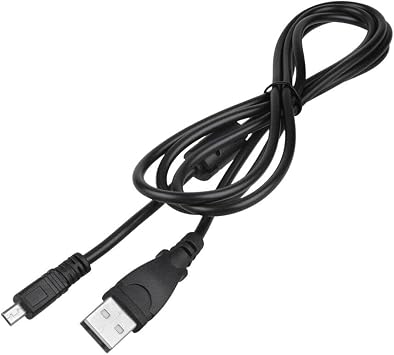
USB Cable for Panasonic Camera Lumix DMC-FP1 DMC-FS42 DMC-FX55 DMC-TS10
Item #:
114976000
BND 30
Price Details
Excluding Shipping & Custom charges ( Shipping and custom charges will be calculated on checkout )
*All items will import from US
0 ratings
Write a review
In stock
 Imported from USA store
QTY:
Order now and get it around Friday, July 10
Secured transaction
Ubuy works hard to protect your security and privacy. Our advanced payment security system ensures confidentiality by encrypting your information during transmission using AES (Advanced Encryption Standards) and SSL (Secure Socket Layer) protocols. Your payment details are 100% secure as we do not share your payment details with third party sellers.
Our Top Logistics Partners


Highly versatile, safety assured, and offers excellent performance for your devices.

Fast
Shipping

Free
Return*

Secure Packaging

100% Original Products

PCI DSS Compliance

ISO 27001 Certified


Note: Step Down Voltage Transformer required for using electronics products of US store (110-120). Recommended power converters Buy Now.


What Stands Out
Compatibility
Designed specifically for Panasonic cameras, ensuring seamless connection for models like Lumix DMC-FP1, DMC-FS42, DMC-FX55, and DMC-TS10 without any compatibility issues.
Durability
Constructed with high-quality materials, this USB cable withstands wear and tear, providing reliable performance and longevity for frequent users and photographers on the go.
Fast Data Transfer
Offers efficient data transfer speeds, enabling quick charging and rapid photo uploads, optimizing workflow for photographers needing immediate access to their images.
Product Details
- Highly Versatility: It is suitable for charging and powering a variety of electronic devices
- Excellent performance: It has good insulating properties for the safe use of electrical equipment
- Safety Assured: It meets stringent safety standards, providing high levels of safety and reliability to protect your devices from power fluctuations and other potential risks
- High efficiency: It is stable and reliable, and can provide a continuous and stable power supply for the equipment
| Other Special Features of the Product | Data Transfer |
| Connector Gender | Male |
| Color | Black |
| Brand Name | Musstad |
| Model | MU86701 |
| Manufacturer | Musstad |
| Part Number | 86701 |
| Brand | Musstad |
| Special Feature | Data Transfer |
| Item Weight | 0.2 lbs (90 grams) |
Who Should Buy?

-
Casual Photographers
Ideal for users who occasionally transfer photos from their Panasonic Lumix cameras to computers or other devices.
-
Travel Enthusiasts
A staple for travelers who need a reliable cable for on-the-go charging and photo backups while exploring.
-
Budget-Conscious Users
Great for those seeking an affordable option without compromising on quality for their Panasonic camera connectivity.

-
Professional Photographers
Not suitable for professionals needing high-speed data transfer or specialized cables for advanced camera systems.
-
Compatibility Seeker
Users with multiple camera brands or models may require a more versatile cable than this specific Panasonic option.
-
Heavy Users
Individuals who frequently use their cameras might find this cable insufficient in terms of durability and longevity.
Product Description
Have any Query? Chat with us
Customer Questions & Answers
-
Question:
What type of USB Cable is compatible with Panasonic Lumix DMC-FP1, DMC-FS42, DMC-FX55, and DMC-TS10 cameras?
Answer: The Panasonic Lumix DMC-FP1, DMC-FS42, DMC-FX55, and DMC-TS10 models typically use a USB Mini-B cable. This type of cable features a small connector that fits snugly into the camera's port, allowing users to transfer files or charge the camera. To ensure optimal performance, it's essential to use a high-quality cable that meets standard specifications, as this can affect data transfer speeds and charging efficiency. -
Question:
Can I use a generic USB cable with my Panasonic Camera?
Answer: Yes, you can use a generic USB Mini-B cable with your Panasonic camera models. However, it's important to choose a reliable brand to avoid potential issues such as slower transfer rates or inconsistent charging. Many photographers prefer manufacturer-approved cables for guaranteed compatibility. Nevertheless, a quality generic option will work for tasks like transferring images from the camera to a computer or charging the device. -
Question:
How do I transfer photos from my Panasonic Lumix camera using the USB cable?
Answer: Transferring photos from your Panasonic Lumix camera is straightforward. Connect the USB cable to your camera and the other end to your computer. Turn on your camera, and your computer should recognize it as a removable device. You can then open the folder displaying your images and easily drag and drop the desired files to your computer. This is great for ensuring your photos are safely stored and easily accessible for editing or sharing. -
Question:
Is it possible to charge my Panasonic Camera using the USB cable?
Answer: Yes, you can charge your Panasonic camera using the USB Mini-B cable. Simply connect one end to the camera and the other end to a compatible USB power source, such as a laptop or a USB wall charger. This is highly convenient for travelers who may not always have access to a dedicated camera charger, allowing them to keep their devices powered while on the go. -
Question:
What should I do if my USB cable is not working with my camera?
Answer: If your USB cable is not functioning with your camera, start by checking both ends of the cable for any visible damage. Next, test the cable with another device to ensure it works properly. If it still does not respond, try using a different USB port on your computer or a different USB cable altogether. Sometimes, issues may arise from the camera's USB port itself, so if problems persist, consider seeking professional assistance. -
Question:
Where can I find a replacement USB Cable for my Panasonic Camera in Brunei?
Answer: You can buy a USB Cable for Panasonic Camera Lumix DMC-FP1, DMC-FS42, DMC-FX55, DMC-TS10 at Ubuy. They offer a selection of compatible USB cables for various camera models, ensuring you find the right fit. Ubuy's platform allows you to conveniently compare options, making it easy to choose a cable that suits your photography needs. -
Question:
Can I use my Panasonic USB cable with other cameras?
Answer: The USB Mini-B cable used for your Panasonic camera can also be used with other devices that have a compatible USB port, such as certain tablets and phones, as well as other brands of digital cameras. This versatility is especially beneficial when you have multiple devices; you can reduce the number of cables you carry. Just make sure the other device supports the Mini-B connector to avoid any connectivity issues. -
Question:
What are some common uses for my Panasonic USB cable aside from charging?
Answer: Aside from charging your Panasonic camera, the USB cable can be utilized for transferring photos and videos to a computer or external storage device. It's also useful for connecting the camera to a projector or TV for viewing photos during presentations or family gatherings. This multifunctionality makes it a valuable accessory for photographers who wish to manage their media efficiently. -
Question:
Are there any tips for maintaining my USB cable for longevity?
Answer: To maintain your USB cable in good condition, always handle it gently during plugging and unplugging. Avoid bending the cable near the connectors to prevent internal damage. Storing the cable in a dry, cool place while avoiding exposure to excessive heat or moisture can also extend its life. Keeping your cables coiled neatly can prevent tangles and wear, optimizing their durability. -
Question:
What speed should I expect with a USB Mini-B cable while transferring files?
Answer: When using a USB Mini-B cable, file transfer speeds typically depend on the USB version. For USB 2.0, speeds can reach up to 480 Mbps. However, actual speeds may vary based on the camera settings and the receiving device's capabilities. Understanding this can help you estimate the transfer time, especially when dealing with large files like high-resolution images or videos, planning your workflow accordingly.
Musstad Cables & Cords Editorial Review
No editorial reviews found
Customer Reviews & Ratings
1 customers ratings
-
5 Star
100%
-
4 Star
0%
-
3 Star
0%
-
2 Star
0%
-
1 Star
0%
Review this product
Share your thoughts with other customers
Product Price History
Important information
- Limitations : For products shipped internationally, please note that any manufacturer warranty may not be valid; manufacturer service options may not be available; product manuals, instructions, and safety warnings may not be in destination country languages; the products (and accompanying materials) may not be designed in accordance with destination country standards, specifications, and labeling requirements; and the products may not conform to destination country voltage and other electrical standards (requiring use of an adapter or converter if appropriate). The recipient is responsible for assuring that the product can be lawfully imported to the destination country. When ordering from Ubuy or its affiliates, the recipient is the importer of record and must comply with all laws and regulations of the destination country.
- Not all the products listed on Ubuy are for sale, as Ubuy is a global search engine. Products are subject to export/trade regulations.
BND 30
Order now and get it around Friday, July 10
This item is not restrict in my country.(Please click on above link if this item is not restrict in your country, So our team will review and allow.)
QTY:
Secured transaction
Ubuy works hard to protect your security and privacy. Our advanced payment security system ensures confidentiality by encrypting your information during transmission using AES (Advanced Encryption Standards) and SSL (Secure Socket Layer) protocols. Your payment details are 100% secure as we do not share your payment details with third party sellers.
Our Top Logistics Partners
Fastest cross-border delivery
Features & Benefits
- Carefully match model numbers for correct power cord selection.
- Versatile for charging and powering various electronic devices.
- Good insulating properties ensure safety during use.
- Meets stringent safety standards for reliability.
- Protects devices from power fluctuations and risks.
- Provides a continuous and stable power supply.