- Home Page /
- Books /
- Computers & Technology /
- Mobile Phones, Tablets & E-Readers /
- Handheld & Mobile Devices /
- Seniors Guide to iPhone: Step-by-Step Instruc...



Item #:
189053974
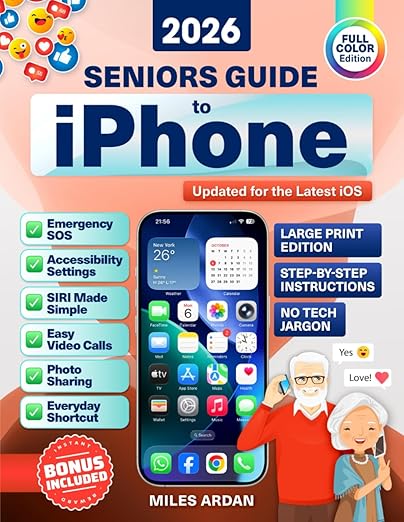
Seniors Guide to iPhone: Step-by-Step Instructions in Large Print with Color Illustrations for the Not-So-Tech-Savvy to Confidently Enjoy iPhone
Item #:
189053974
BND 46
Price Details
Excluding Shipping & Custom charges ( Shipping and custom charges will be calculated on checkout )
*All items will import from US
In stock
 Imported from USA store
QTY:
Order now and get it around Thursday, June 25
Secured transaction
Ubuy works hard to protect your security and privacy. Our advanced payment security system ensures confidentiality by encrypting your information during transmission using AES (Advanced Encryption Standards) and SSL (Secure Socket Layer) protocols. Your payment details are 100% secure as we do not share your payment details with third party sellers.
Our Top Logistics Partners


Technology doesn’t have to be confusing. This senior-friendly guide uses clear step-by-step instructions, large print, and helpful illustrations so you can finally enjoy everything your iPhone has to offer.

Fast
Shipping

Free
Return*

Secure Packaging

100% Original Products

PCI DSS Compliance

ISO 27001 Certified


Note: Step Down Voltage Transformer required for using electronics products of US store (110-120). Recommended power converters Buy Now.


What Stands Out
Large Print
Designed with seniors in mind, the large print ensures easy reading, allowing users to comfortably follow instructions without straining their eyes.
Color Illustrations
Vivid color illustrations complement the text, providing clear visual guidance that enhances comprehension and empowers seniors to navigate their iPhones confidently.
User-Friendly Approach
Step-by-step instructions are tailored for not-so-tech-savvy individuals, enabling seniors to master their iPhone features independently and enjoy improved connectivity and functionality.
Product Details
- LARGE PRINT • SENIOR-FRIENDLY ILLUSTRATIONS📱 Tired of asking your kids or grandkids for help with your iPhone?Now it’s your turn to feel confident, independent, and even surprise them with your new tech skills!Technology doesn’t have to be confusing. This senior-friendly guide uses clear step-by-step instructions, large print, and helpful illustrations so you can finally enjoy everything your iPhone has to offer—without stress, confusion, or tech jargon.Stay connected with family and friends on FaceTime, send photos and messages in seconds, and activate safety features like SOS when you need them. Every step is explained simply, so you’ll never feel left behind.✨ Here’s what you’ll learn inside:✅ The basics made simple: Power on, set up, and secure your iPhone the right way✅ Make it yours: Customize text size, sounds, and settings for maximum comfort✅ Stay in touch: Calls, texts, and video chats explained in plain English✅ Photos & memories: Capture, edit, and share special moments instantly✅ Navigate safely online: Browse, email, and shop without worry✅ Stay safe from scams: Spot and avoid suspicious calls, texts, and emails✅ Everyday life shortcuts: Use Notes, Reminders, Calendar, and simple tools to make daily life easier✅ Safety first: SOS, emergency contacts, and must-know security features✅ Apps & fun: Explore maps, music, games, and tools that make life easier🎁 BONUS GIFTS INCLUDED (via QR code):🎁 Fresh monthly tips & tricks tailored for seniorsWith this book, you’ll finally use your iPhone with confidence—on your own, at your pace, and without asking for help.Take the first step today—your iPhone mastery is just one click away!
| Publisher | Independently published |
| Publication date | October 9, 2025 |
| Language | English |
| Print length | 112 pages |
| ISBN-13 | 979-8269109985 |
| Item Weight | 12.5 ounces (354.38 grams) |
| Dimensions | 8.5 x 0.26 x 11 inches (21.6 x 0.7 x 27.9 cm) |
Who Should Buy?

-
Elderly Users
Seniors who seek a user-friendly guide to navigate iPhone features independently will find this resource invaluable.
-
Technophobes
Individuals hesitant about technology will appreciate the step-by-step instructions that simplify using an iPhone.
-
Visual Learners
Users who benefit from visual aids will love the large print and color illustrations that enhance understanding.

-
Tech-Savvy Users
Experienced iPhone users may find the content too basic and not offer challenges or advanced tips.
-
Younger Audience
Younger individuals looking for quick guides to iPhone features might not relate to the content or format.
-
Professionals
Tech professionals seeking detailed technical specifications or troubleshooting might find this guide overly simplistic.
Product Description
Have any Query? Chat with us
Customer Questions & Answers
-
Question:
What topics are covered in the Seniors Guide to iPhone?
Answer: The Seniors Guide to iPhone covers a wide range of topics including basic iPhone functions, setting up the device, using apps, making calls, sending messages, and understanding settings. Additionally, it includes large print and color illustrations to simplify the learning process. This comprehensive approach ensures that even those who are not tech-savvy can follow along easily. For instance, seniors can learn how to navigate the internet or use social media, helping them stay connected with family and friends. -
Question:
Is the guide suitable for complete beginners?
Answer: Yes, the guide is designed specifically for complete beginners. It explains concepts using simple language and step-by-step instructions, which are complemented by large print and color illustrations. This makes it easier for seniors who might feel overwhelmed by technology. A practical scenario would be a grandparent using the guide to send a text message to their grandchildren, gaining confidence in using their iPhone independently. -
Question:
How does the large print format benefit seniors?
Answer: The large print format is particularly beneficial for seniors who may have visual impairments or difficulty reading small text. By enhancing readability through larger text, the guide allows for a less frustrating learning experience. For example, a senior can easily identify important settings and instructions without straining their eyes, making their interaction with the iPhone much more enjoyable. -
Question:
Are there color illustrations in this guide?
Answer: Yes, the guide features vibrant color illustrations that accompany the step-by-step instructions, enhancing comprehension. These visuals help clarify processes and make learning more engaging. For instance, a senior trying to understand the iPhone's camera function can visually follow along to grasp how to take photos, making the learning process much more intuitive. -
Question:
Can this guide help seniors with specific iPhone features?
Answer: Absolutely! The guide elucidates specific features like Siri, FaceTime, and apps like Facebook or WhatsApp. It breaks down complex functionalities into manageable steps that seniors can easily grasp. For example, a senior can learn how to set up a video call with family using FaceTime, thus bridging the gap in communication with loved ones. -
Question:
How does the guide address common tech fears among seniors?
Answer: The guide directly addresses common fears by employing a patient and reassuring tone, coupled with straightforward instructions. It emphasizes that it's okay to take time to learn at one’s own pace. This approach encourages seniors to engage with their iPhones without anxiety. A scenario might include a senior hesitant to explore the App Store but eventually doing so with confidence due to the guide's support. -
Question:
What makes this guide different from other iPhone manuals?
Answer: This guide stands out through its focus on seniors, utilizing large print and visuals specifically designed for those not accustomed to technology. Unlike other manuals that may use jargon or complex terms, it simplifies information. For example, while other manuals may gloss over important functions, this guide ensures every feature is explained in a relatable manner, catering directly to a senior audience. -
Question:
Is the guide updated for the latest iPhone models?
Answer: Yes, the guide is typically updated to reflect the latest iPhone models and the features they offer. This ensures that seniors are learning about current functionalities and not outdated information. For instance, if new apps or features are released, this guide would provide the necessary steps to utilize them, allowing seniors to take full advantage of their devices. -
Question:
How can this guide enhance the digital literacy of seniors?
Answer: By providing clear, step-by-step instructions and valuable insights, the guide enhances the digital literacy of seniors, enabling them to use their iPhones more confidently. As they learn to navigate features, their comfort with technology grows, leading to a more connected lifestyle. For instance, a senior may start using their iPhone to browse the internet for information or join online communities, enhancing their daily lives. -
Question:
Where can I buy the Seniors Guide to iPhone?
Answer: You can purchase the Seniors Guide to iPhone at Ubuy. Ubuy offers a user-friendly shopping experience with various delivery options available in Brunei. They ensure you receive the guide quickly, so you can start learning how to enjoy your iPhone to the fullest without hassle.
Handheld & Mobile Devices Editorial Review
**** The "Seniors Guide to iPhone: Step-by-Step Instructions in Large Print with Color Illustrations" has garnered widespread acclaim for its user-friendly approach tailored specifically for seniors or those who may not be tech-savvy. Customers have praised the book for its clear, step-by-step instructions that are easy to follow, thanks to the thoughtfully designed large print and colorful illustrations. This accessibility significantly enhances the learning experience, allowing users to feel more confident in navigating their iPhone. Specifically noted is the guide's focus on crucial aspects of using an iPhone, including setup, personalization, messaging, and security features. Readers particularly appreciate the sections on online safety and scam awareness, underscoring the book's practicality beyond mere functionality. The author's patient, jargon-free explanations help demystify the technology, transforming what is often viewed as a daunting device into an approachable one. Reviews indicate that the book serves as an invaluable resource, especially for older adults, enabling them to gain proficiency in everyday phone functions at their own pace. Users report a remarkable turnaround in confidence levels, with many seniors going from minimal knowledge of smartphones to proficiently using apps, sending messages, and connecting with family through FaceTime. Overall, the guide is seen as a pivotal tool in bridging the generational gap in technology usage, making smartphones accessible and enjoyable for seniors. **
Customer Reviews & Ratings
64 customers ratings
-
5 Star
68%
-
4 Star
14%
-
3 Star
10%
-
2 Star
4%
-
1 Star
4%
Review this product
Share your thoughts with other customers
Pros
- Large print and colorful illustrations aid comprehension.
- Clear, step-by-step instructions simplify complex topics.
- Focuses on essential features relevant to seniors.
- Increases confidence and independence in using iPhone.
- Covers practical topics like online safety and scam awareness.
Cons
- Some users may seek more advanced functionalities not covered.
Product Price History
Important information
- Limitations : For products shipped internationally, please note that any manufacturer warranty may not be valid; manufacturer service options may not be available; product manuals, instructions, and safety warnings may not be in destination country languages; the products (and accompanying materials) may not be designed in accordance with destination country standards, specifications, and labeling requirements; and the products may not conform to destination country voltage and other electrical standards (requiring use of an adapter or converter if appropriate). The recipient is responsible for assuring that the product can be lawfully imported to the destination country. When ordering from Ubuy or its affiliates, the recipient is the importer of record and must comply with all laws and regulations of the destination country.
- Not all the products listed on Ubuy are for sale, as Ubuy is a global search engine. Products are subject to export/trade regulations.
BND 46
Order now and get it around Thursday, June 25
This item is not restrict in my country.(Please click on above link if this item is not restrict in your country, So our team will review and allow.)
QTY:
Secured transaction
Ubuy works hard to protect your security and privacy. Our advanced payment security system ensures confidentiality by encrypting your information during transmission using AES (Advanced Encryption Standards) and SSL (Secure Socket Layer) protocols. Your payment details are 100% secure as we do not share your payment details with third party sellers.
Our Top Logistics Partners
Fastest cross-border delivery
Features & Benefits
- Large print for easy reading.
- Step-by-step instructions designed for seniors.
- Clear illustrations for better understanding.
- Learn to use FaceTime, send messages, and stay connected.
- Understand safety features and how to avoid scams.
- Bonus monthly tips & tricks available via QR code.